
What Is an Aging Report: Predict Churn & Revenue 2026

Ayush Soni
Founder, Revcover
On this page
- Beyond Accounting From Overdue Invoice to Churn Signal
- Anatomy of an Aging Report A Triage System for Your Revenue
- What sits inside the report
- Why the buckets matter
- How to Read the Signs Interpreting Aging Data for Business Health
- Look for movement, not just totals
- Use aging data to pressure-test operations
- Connecting Aging Data to Involuntary and Voluntary Churn
- When overdue means payment friction
- When overdue means the customer is pulling away
- An Actionable Playbook for Revenue Recovery at Every Stage
- What to do by bucket
- Aging Report Action Plan
- Automating Your Aging Report Workflow with Stripe
- The workflow that actually scales
- What good automation should do
You're probably looking at a familiar pattern right now. A customer's payment failed, the invoice slipped past due, nobody treated it as urgent, and now Finance sees an overdue balance while Success sees a quiet account and Growth sees MRR at risk. Each team has part of the story, but nobody has the full one.
That's why the answer to what is an aging report matters more than most SaaS teams think. On paper, it's an accounts receivable report. In practice, it's one of the clearest early-warning systems you have for churn, failed payment recovery, and cash flow risk.
Used passively, it tells you who owes money. Used well, it tells you which accounts need a retry flow, which need a card-update path, which need a save offer, and which are already slipping out of reach.
Beyond Accounting From Overdue Invoice to Churn Signal
A failed payment rarely looks dramatic on day one. A card expires. A bank declines the charge. The invoice lands in the earliest overdue bucket, and the account stays active just long enough for everyone to assume it'll sort itself out.
Then it doesn't.
By the time that same account has gone from mildly overdue to materially aged, the problem usually isn't just collections anymore. It's retention. It's product engagement. It's customer intent. A late invoice can be the first visible signal that a subscriber is drifting toward churn.
That's the gap that teams often miss. They treat the aging report as a month-end accounting artifact when it should be part of a live operating system for revenue protection. A 2024 Gartner note cited by Revcover says 75% of SaaS churn is preventable if detected early, yet aging reports are often reviewed too late to influence the outcome.
Practical rule: The first overdue invoice is rarely “just billing” in a subscription business.
In a traditional business, an aging report helps collect money already earned. In SaaS, it also helps protect revenue you're still trying to keep. That's a different job. It changes who should care about the report and how fast they should act on it.
The strongest teams don't wait for Finance to circulate a stale spreadsheet. They connect overdue status to immediate action. If the signal points to payment friction, they trigger recovery. If the signal lines up with cancellation behavior or declining engagement, they route the account into a retention motion.
That's the true answer to what is an aging report for a subscription company. It's not just a summary of unpaid invoices. It's a churn signal with a timer attached.
Anatomy of an Aging Report A Triage System for Your Revenue
An aging report is easiest to understand if you stop thinking like an accountant and start thinking like an operator running triage.
A hospital doesn't treat every patient with the same urgency. Your receivables shouldn't be handled that way either. An accounts receivable aging report groups unpaid invoices by how long they've been outstanding so your team can decide what needs attention first.
What sits inside the report
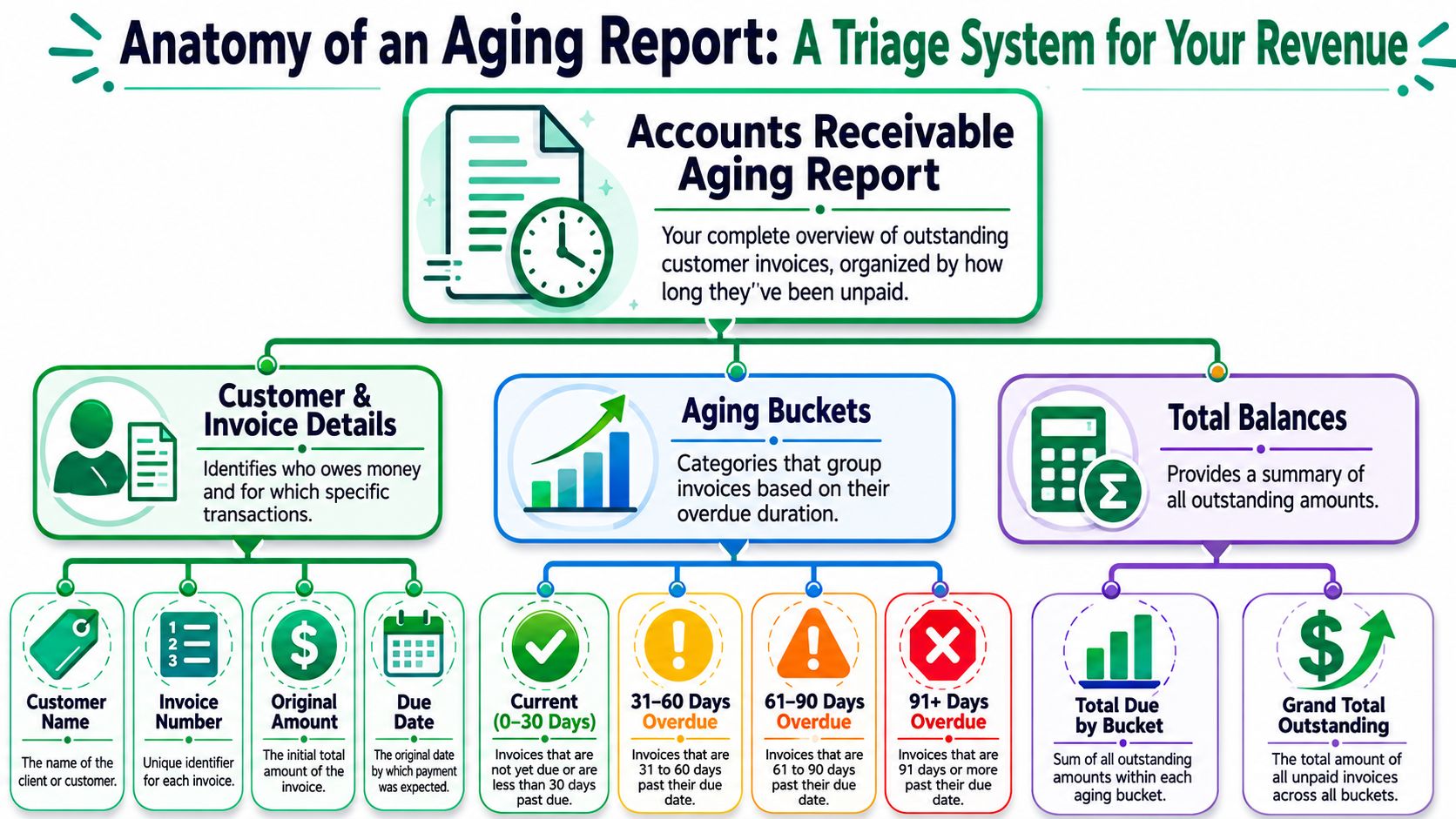
At minimum, a usable aging report pulls together the fields your team needs to make decisions:
- Customer identity: The customer name or account record tells you who owes the balance and whether this is a strategic logo, a self-serve account, or a chronically late payer.
- Invoice details: Invoice ID, invoice amount, invoice date, due date, and payment status are the core inputs.
- Days outstanding: This is the working calculation. It's based on the current reporting date minus the invoice due date.
- Bucket assignment: The system sorts each open invoice into standard ranges such as 0 to 30 days, 31 to 60 days, 61 to 90 days, and over 90 days.
If you work in subscriptions, it also helps to read this alongside revenue schedules and billing logic. Teams that blur cash collection and earned revenue often create noise in reporting, which is why it's useful to keep concepts like deferred revenue separate from overdue receivables.
Why the buckets matter
The buckets aren't cosmetic. They tell you how likely recovery still is, and how aggressive your response should become.
Invoices beyond 90 days are a critical risk zone, and some analyses show a default rate of over 50% for balances outstanding more than 120 days. Efficient SaaS businesses typically aim to keep their Average Collection Period under 45 days, because a slower collection cycle puts pressure on cash flow and usually reflects process issues upstream.
Here's the simple operating view:
| Bucket | What it usually means | Recommended mindset |
|---|---|---|
| 0 to 30 days | Early slippage, failed payment, dispute, or internal delay | Recover fast |
| 31 to 60 days | Problem is no longer incidental | Investigate cause |
| 61 to 90 days | Elevated account risk | Escalate and segment |
| 90+ days | Recovery odds deteriorate sharply | Decide, don't drift |
A good aging report doesn't just show lateness. It ranks your revenue risk by urgency.
Teams that only glance at the grand total miss the point. The structure is the insight. Once you know where balances are clustering, you can decide whether you're dealing with a normal billing wobble, a preventable failed-payment pattern, or a wider retention issue.
How to Read the Signs Interpreting Aging Data for Business Health
Teams often read an aging report row by row. Strong operators read it for patterns.
One overdue invoice might be noise. A steady migration of balances from current to older buckets usually means something in your billing, collections, or customer journey isn't working the way you think it is.
Look for movement, not just totals
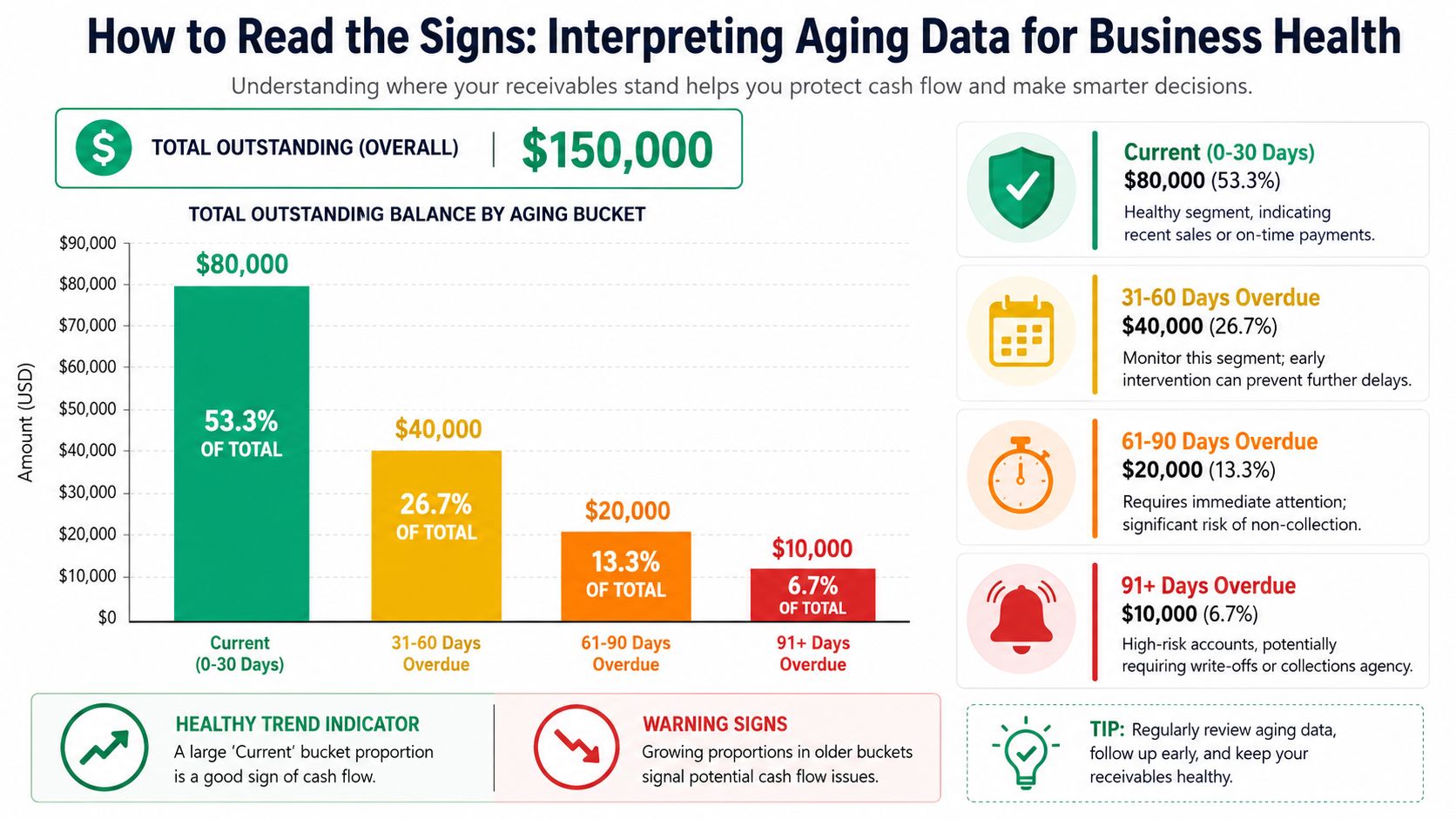
The most useful question isn't “How much is overdue?” It's “Where is overdue revenue moving?”
If invoices repeatedly slide from 0 to 30 into 31 to 60, your reminder cadence may be weak, your retry logic may be late, or customers may be hitting avoidable billing friction. If balances keep collecting in 61 to 90 and then stay there, your team is probably reacting after the best recovery window has already passed.
A few practical signs matter more than the headline total:
- A swollen early bucket: Usually points to payment recovery issues, not yet to true debt.
- A growing middle bucket: Often signals process breakdowns, unresolved disputes, or customers reassessing value.
- A stubborn oldest bucket: Tells you decision-making is lagging. Old balances rarely improve with patience alone.
Data in the verified material makes the cost of delay clear. Without an effective aging report tied to automated recovery, businesses lose 1.5% to 2.5% of MRR annually from failed payments, involuntary churn accounts for about 30% of total SaaS churn, and 40% of delinquent accounts are never recovered if they stay in the >90 day bucket for more than two weeks.
Use aging data to pressure-test operations
Aging data is also how finance and RevOps pressure-test cash flow health.
The report feeds metrics like Days Sales Outstanding (DSO) and Average Collection Period. You don't need a complicated model to make it useful. If more balances are aging into later buckets over time, your DSO is likely rising, and working capital is getting tighter.
In subscription businesses, that matters because overdue balances don't sit in isolation. They affect renewal confidence, support load, forecasting quality, and the stability of monthly recurring revenue.
If your team reviews aging only at month-end, you're measuring revenue leakage after it has already spread.
I've found one habit especially useful. Review aging trends by segment, not just in aggregate. Enterprise accounts, annual contracts, monthly self-serve customers, and recently expanded accounts don't age for the same reasons. One bucket can hide several distinct operational failures.
Read the report like a health scan:
- By customer segment: Are self-serve accounts failing payment more often?
- By plan or billing model: Are monthly subscribers aging faster than annuals?
- By team handoff: Do overdue invoices cluster after upgrade, renewal, or contract amendment?
- By reason code where available: Are disputes, declines, and cancellation behavior appearing together?
That's when the report becomes diagnostic instead of clerical.
Connecting Aging Data to Involuntary and Voluntary Churn
Not every overdue invoice means the same thing. That's where important distinctions are often overlooked.
They see “late” and launch the same collection message to everyone. In SaaS, that approach doesn't just underperform. It can actively push a recoverable customer closer to cancellation.
When overdue means payment friction
Some overdue balances are classic involuntary churn signals. The customer still wants the product, but the payment didn't go through. A card expired. The issuer declined the charge. The billing contact missed the reminder. The fix is operational, not emotional.
That's why aging context matters. Verified data notes that SaaS churn is roughly 40% involuntary and 60% voluntary, and the report should be read differently depending on the driver. A 1 to 30 day aging status caused by a failed payment needs a recovery flow, not a retention script. For a deeper breakdown of the difference, this guide on voluntary vs involuntary churn is a useful companion.
In this situation, the right response usually includes:
- Fast retry logic: Don't wait for the next finance review.
- Clear card-update paths: Remove friction. Don't bury the fix behind support tickets.
- Customer-safe reminders: Keep the tone service-oriented, not punitive.
When overdue means the customer is pulling away
Aging data can also surface voluntary churn in progress.
This is usually subtler. A previously reliable account suddenly stops paying. The invoice ages past the earliest bucket. Product usage softens. Someone on the account reviews cancellation options or mentions price, missing features, or lack of fit. Finance sees lateness. Success should see risk.
The same aging status needs a different tactic if the customer is reconsidering the relationship rather than struggling with payment rails.
An overdue invoice tells you what happened in billing. It doesn't tell you why. Your job is to connect the billing signal to customer intent.
That means layering aging data with qualitative and behavioral context:
| Signal combination | Likely interpretation | Better response |
|---|---|---|
| Failed payment + healthy usage | Involuntary churn risk | Recovery email and card update |
| Overdue invoice + cancellation review | Voluntary churn risk | Save offer or success outreach |
| Overdue invoice + support frustration | Dissatisfaction building | Service recovery and ownership |
| Long-time payer suddenly aging | Changed perceived value | Human intervention, not generic dunning |
The mistake is treating all receivables as collections inventory. Subscription revenue doesn't work like that. Some balances need AR discipline. Others need retention craft.
When teams connect aging data to churn type, they stop blasting generic reminders and start routing accounts into the right motion. That's where recovery rates improve, customer experience stays intact, and Finance stops operating as the final team to discover a churn problem.
An Actionable Playbook for Revenue Recovery at Every Stage
An aging report is only valuable if it changes behavior. If your process ends with “review weekly and follow up as needed,” you don't have a playbook. You have a ritual.
The practical approach is to attach a distinct response to each bucket and escalate based on both age and account context. The report itself is a dynamic operating view. In more advanced setups, teams layer in risk scoring so older buckets and high-value accounts get prioritized before the balance drifts into low-recovery territory.
What to do by bucket
For 0 to 30 days, speed beats severity. This bucket is where payment friction is still fixable without much drama. Use automated reminders, a clean payment-update path, and smart retries. Keep the message simple. If the likely problem is an issuer decline, your team should understand the common failure patterns behind a card declined by issuer event so they can remove friction instead of sending vague notices.
For 31 to 60 days, stop assuming the problem is mechanical. This is the point where a generic dunning sequence starts losing power. Review recent product activity, support history, and contract context. If the customer is still engaged, finance-led follow-up may work. If engagement is weak, route the account to Customer Success or Sales before the relationship hardens into silence.
For 61 to 90 days, prioritize aggressively. Verified guidance in the source material notes that advanced implementations assign higher non-collection probabilities to older buckets, which is why strong teams pull high-value accounts in this range to the top of the queue. For these accounts, customized save offers, plan changes, temporary pauses, or senior outreach can still prevent revenue leakage.
For 90+ days, indecision becomes expensive. You need a clear policy. Some accounts deserve one final recovery attempt. Others should move to write-off review or formal collections handling, depending on your business model and contract structure.
Operator's lens: By the time an account is deep in aging, the question isn't “should we follow up?” It's “which path still has a credible chance of recovery?”
Aging Report Action Plan
| Aging Bucket | Primary Risk | Recommended Manual Action | Automated Action (with Revcover) |
|---|---|---|---|
| 0 to 30 days | Failed payment and early involuntary churn | Check account history, confirm whether issue is billing-only, and escalate only if account is high value or behavior looks unusual | Trigger payment reminders, card-update prompts, and coordinated recovery messaging |
| 31 to 60 days | Billing issue becoming retention risk | Review usage, support tickets, and cancellation intent. Decide whether Finance, Success, or Sales should own the next touch | Route based on billing state and account context, then trigger the right recovery or save flow |
| 61 to 90 days | High risk of revenue loss | Prioritize manual outreach for high-value accounts, offer downgrade or pause where appropriate, and involve a decision-maker | Escalate workflows, surface alerts, and coordinate targeted intervention based on risk signals |
| 90+ days | Bad debt and likely churn finalization | Make a deliberate call on final recovery, collections treatment, or write-off review | Flag for final workflow stage, internal notification, and closure tracking |
What doesn't work is the one-size-fits-all collections email sent on a fixed cadence to every overdue account. It ignores account value, churn driver, and the reason the invoice aged in the first place.
What works is a tiered model with ownership rules. Finance handles straightforward recovery. Success handles accounts showing dissatisfaction. Sales gets pulled in when the commercial relationship is salvageable but stalled. Leadership only steps in for strategic accounts where the revenue justifies the effort.
That's how an aging report becomes operational. It assigns urgency, clarifies ownership, and gives every overdue state a next move.
Automating Your Aging Report Workflow with Stripe
Manual aging workflows break down fast. Someone exports data from Stripe, someone else cleans it up in a spreadsheet, Finance reviews it after the fact, and by then the best intervention window has narrowed.
The better model is event-driven. Stripe remains the billing source of truth, and your workflow reacts as invoice status changes instead of waiting for a monthly review cycle.
The workflow that actually scales
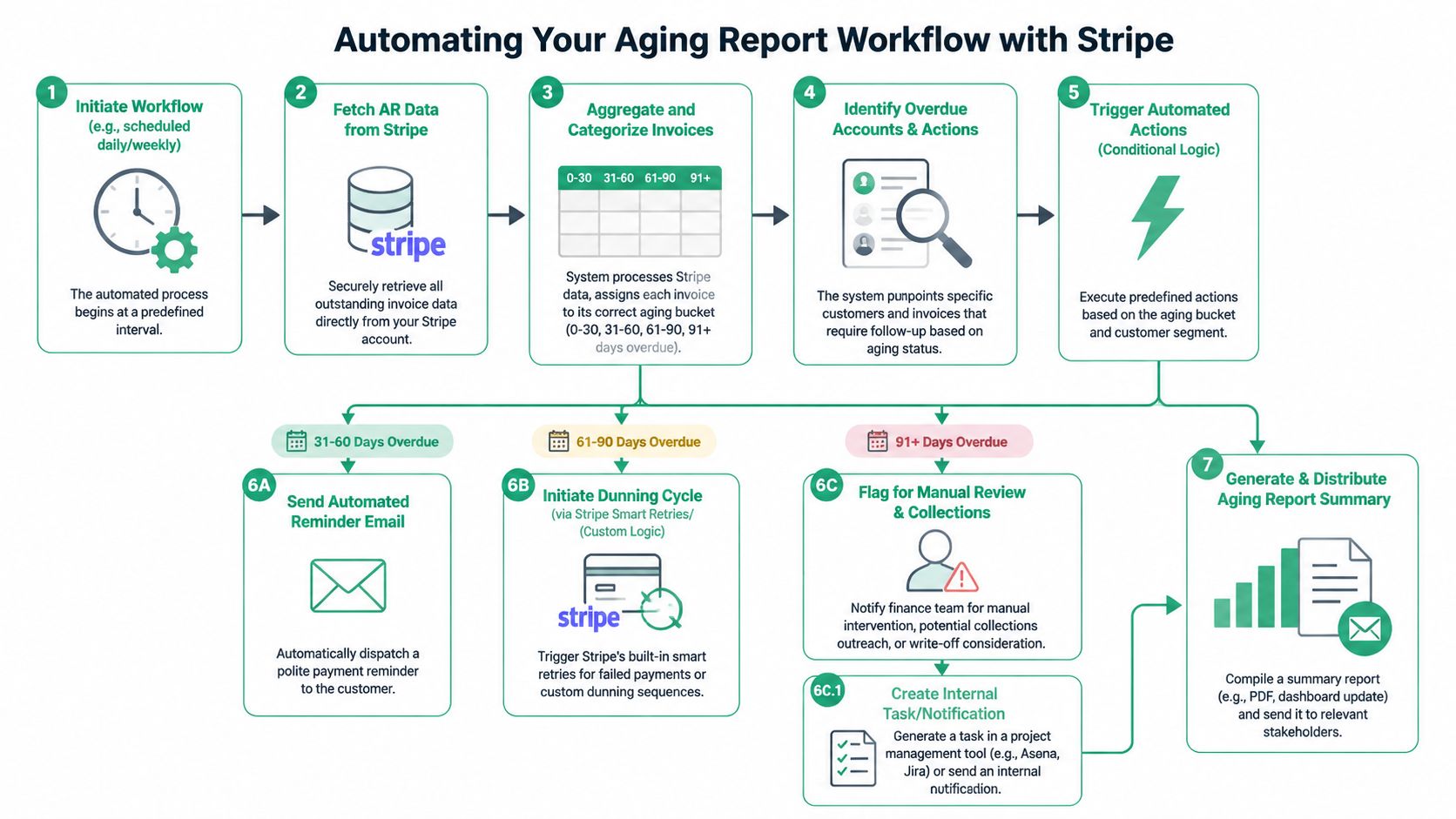
A solid implementation usually follows this sequence:
- Pull billing data from Stripe
Invoices, due dates, payment status, and customer records need to sync on a schedule that matches how quickly you want to react. - Calculate days outstanding
The underlying logic is straightforward: current date minus invoice due date. Once calculated, each invoice gets mapped into your aging bucket schema. - Layer in account context
Aging alone isn't enough. Add plan type, customer value, recent usage, support signals, and cancellation behavior where possible. - Trigger action by condition
A failed payment can start a retry and reminder sequence. A mid-stage overdue invoice on a high-value account can create a Slack alert or CRM task. A late-stage balance can be flagged for manual review. - Push summaries to operators
Dashboards help, but teams also need alerts and task creation where they already work.
What good automation should do
The goal isn't just to generate a prettier report. It's to shorten the time between signal and action.
Good automation should:
- Reduce lag: Don't wait for end-of-month reporting to spot overdue risk.
- Route intelligently: Different accounts need different owners and different messages.
- Preserve customer experience: Payment recovery should feel helpful. Save offers should feel relevant.
- Create traceability: Every triggered action should be visible in your systems so Finance, Success, and RevOps can see what happened.
A lot of teams get the definition of what an aging report is wrong. They think of it as a static finance deliverable. In a Stripe-based subscription business, it should function more like a rules engine powered by billing status.
If your stack can detect the change, classify the risk, trigger the workflow, and surface the outcome, the aging report stops being a spreadsheet and starts acting like infrastructure.
If you want to turn Stripe billing signals into real-time recovery and retention workflows, Revcover is built for that job. It helps subscription SaaS teams intercept cancellation intent, coordinate save offers and payment recovery, and tie outcomes back to recovered monthly recurring revenue without replacing Stripe as the billing source of truth.