
How to Reduce Churn Rate: A 2026 Playbook

Ayush Soni
Founder, Revcover
On this page
- Beyond the Cancellation Email A New Churn Playbook
- Diagnose Your Churn Before You Treat It
- Separate the churn you can engineer away
- Use behavior to spot risk before the cancel click
- Building a Smart Cancellation and Save Flow
- Replace one cancel page with decision logic
- Build a save offer library instead of improvising
- What hurts save performance
- Automating Involuntary Churn and Payment Recovery
- Design dunning as a coordinated system
- When to gate access and when not to
- Measure What Matters Recovered MRR and Experiments
- Make recovered MRR your operating metric
- Run experiments that your billing data can verify
- Operationalizing Retention Across Your Team
- Turn churn signals into real-time team workflows
- Give each team a retention job
You know the moment. A Slack alert fires, Stripe sends a cancellation notice, or someone forwards the dreaded “customer canceled” email with no context. You stare at an account you worked hard to acquire, and all you have is a timestamp and maybe a vague survey response that says “too expensive” or “not a fit.”
Most SaaS teams still handle churn like an after-the-fact customer service problem. Someone sends a manual email. Someone else exports cancellation reasons into a spreadsheet. Finance watches failed payments pile up until the customer disappears. Product hears about churn weeks later, stripped of the account context that would've made the feedback useful.
That approach overlooks the underlying problem. Churn is not one event. It's a system of signals, decisions, and handoffs. If you want to reduce churn rate, you need technology that connects cancellation intent, payment failures, product usage, and follow-up actions into one measurable loop tied to MRR.
Beyond the Cancellation Email A New Churn Playbook
The old playbook starts too late. A customer clicks cancel, the billing system records the change, and your team reacts after the revenue is already halfway out the door. By then, you're working from scraps. No buyer context. No product usage history in the workflow. No structured path to save the account.
A better system starts earlier and works on multiple fronts at once. It watches for product disengagement before the customer reaches the cancel page. It captures intent inside the app when they do. It routes them to the right next step instead of dumping everyone into the same offboarding form. It also treats failed payments as recoverable events, not passive losses.
Practical rule: Don't build separate churn processes for billing, support, product feedback, and account saves. Build one operating loop with different entry points.
In practice, that means three connected motions.
First, you detect risk. That comes from usage decline, account status, plan context, and billing events.
Second, you intervene. A user who says the product is too expensive needs a different path than a customer whose card expired or a team that's blocked on one missing feature.
Third, you learn. Every canceled account, recovered payment, accepted pause, rejected discount, and support handoff should feed a dataset your team can act on.
Here's the shift that matters most:
| Old approach | New approach |
|---|---|
| Churn handled after cancellation | Churn handled from first risk signal through offboarding |
| Generic cancel page | Context-aware routing by reason, plan, usage, and value |
| Payment failures treated as billing noise | Payment failures handled as active recovery workflows |
| Feedback stored in surveys | Feedback tied to account context and MRR |
| Success judged loosely | Success tied to recovered MRR and verified outcomes |
When leaders ask how to reduce churn rate, they often expect one tactic. Better onboarding. Better support. Better pricing. Those all matter, but they don't create consistency by themselves. Consistency comes from instrumentation, routing, and ownership. That's what turns churn reduction from a wish into an operating system.
Diagnose Your Churn Before You Treat It
Most churn programs underperform because teams blend very different problems into one metric. If you don't separate the causes, you'll end up applying product fixes to billing failures and discount offers to accounts that need onboarding help.
Separate the churn you can engineer away
Start with the cleanest split: voluntary churn versus involuntary churn.
Voluntary churn is when a customer actively decides to leave. That usually points to a value gap, a pricing mismatch, poor onboarding, weak adoption, or a product issue.
Involuntary churn happens when the customer didn't intend to leave, but the subscription still lapses because payment collection failed. That's a billing and workflow problem first.
Those categories need different owners, different triggers, and different recovery paths.
A simple way to structure the diagnosis is this:
- Voluntary churn bucket: cancellation intent, downgrade requests, repeated “too expensive” or “missing feature” reasons, declining use of core workflows.
- Involuntary churn bucket: card expiry, issuer declines, repeated failed invoices, unpaid renewals, accounts stuck in past-due status.
- Gray area bucket: customers who stop using the product and later churn, because the root problem may be onboarding, fit, support, or changing business needs.
If your current dashboard only shows one headline churn number, fix that first. Teams make better decisions when each loss is labeled by mechanism, not just outcome.
Use behavior to spot risk before the cancel click
The best save flow in the world won't help if your team only notices risk after the customer reaches the billing screen. You need leading indicators.
Useful signals usually come from product analytics and account activity:
- Falling core feature usage: not just fewer logins, but lower use of the feature that created the original buying case.
- Silent seats or inactive admins: a workspace may still be “active” while decision-makers have disengaged.
- Support patterns: repeated confusion around setup, integrations, or permissions often shows up before cancellation.
- Stalled expansion behavior: customers stop inviting teammates, stop creating new projects, or stop touching higher-value workflows.
This is where structured feedback analysis matters. A clean process for reviewing and clustering customer comments helps teams separate a loud anecdote from a recurring churn theme. If you're refining that practice, this guide to customer feedback analysis is a useful companion.
Treat risk scoring like triage, not prophecy. The point isn't to “predict churn” perfectly. The point is to decide which accounts deserve which intervention now.
A simple account health model should blend behavior, billing state, and account value. High-value accounts with sudden usage decline and an open payment issue should not sit in the same queue as a low-usage self-serve account on a monthly starter plan.
Here's a practical diagnostic framework:
| Signal type | What it suggests | Best next action |
|---|---|---|
| Decline in key workflow usage | Value realization problem | Customer success outreach or education |
| Cancel intent with stated reason | Immediate save opportunity | Route to reason-specific path |
| Failed renewal payment | Recoverable billing event | Dunning workflow with update path |
| Repeated feature complaints | Product gap | Escalate with revenue-weighted context |
Teams that reduce churn rate consistently do one thing well. They stop treating churn as a customer sentiment category and start treating it as an operational classification problem.
Building a Smart Cancellation and Save Flow
A default cancel button is clean for the product team and expensive for the business. It assumes every user who wants to leave should get the same experience, regardless of tenure, plan size, usage depth, or reason for leaving. That's lazy design.
A strong cancellation flow doesn't trap people. It creates a relevant fork in the journey. Some customers should cancel quickly and cleanly. Others should see an alternative that matches the problem they have.
Replace one cancel page with decision logic
The first job of the flow is to capture intent while the customer is still in context. Don't wait for a follow-up email. Ask inside the product, at the moment of cancellation, why they want to leave.
Then route based on what you know:
- Stated reason
- Current plan
- Account tenure
- Recent product usage
- Account value
- Open support or billing issues
That structure matters because personalized saves outperform generic ones by a wide margin. According to Gong's churn benchmark discussion, personalizing cancellation offers by revisiting buyer purchase reasons and addressing specific pain points increases voluntary churn reduction success rates to 30-35%. The same source says 60% of personalized save offers succeed versus 22% for generic ones, and obstructive experiences or lack of clean cancellation options reduce success by 15-20%.
That last point is easy to miss. Friction isn't the same thing as retention. If users feel trapped, you may save the subscription briefly and still damage trust.
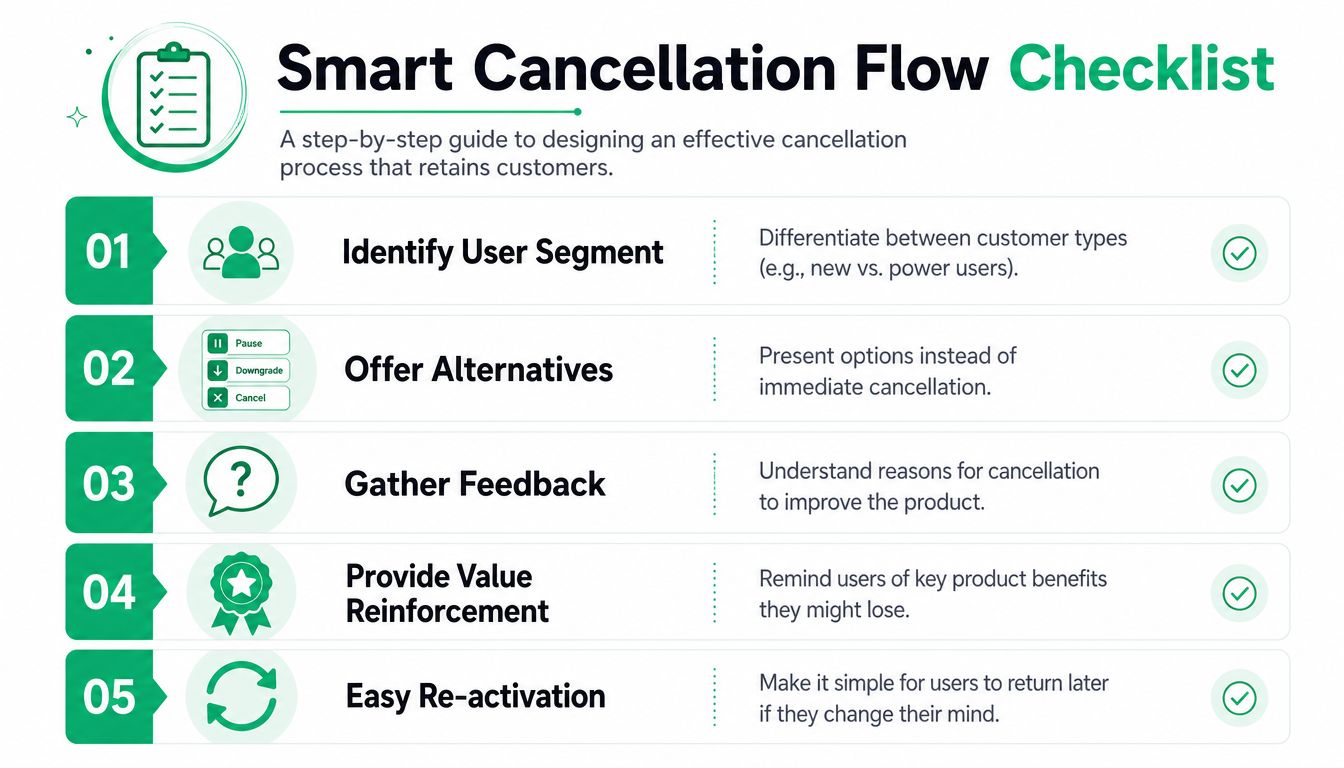
A smart cancellation flow usually follows this sequence:
- Capture the reason first. Keep it short. Make the choices specific enough to route action.
- Check account context. A long-term power user and a trial conversion with low usage should not see the same path.
- Present one relevant save option. Don't throw five popups at the user.
- Offer human help when the reason points to solvable friction.
- Keep cancellation clean if they still want out.
Build a save offer library instead of improvising
The best save systems aren't creative in the moment. They're prebuilt.
You need a small offer library tied to distinct churn reasons. For example:
| Cancellation reason | Better save path | Why it works |
|---|---|---|
| Too expensive | Downgrade or temporary discount | Reduces budget pressure without forcing full exit |
| Not using it enough | Pause or lighter plan | Matches low current need |
| Missing feature | Support or product handoff | Keeps the account alive when the gap may be solvable |
| Seasonal need | Time-bound pause | Preserves relationship without forcing active use |
| Setup confusion | Guided help session | Addresses unrealized value instead of pricing |
One important note from operating these flows: a save offer should solve the problem the user reported, not the problem you wish they had. If someone says they're not using the product, a discount often misses the issue. If someone says the product lacks a needed feature, a pause may just delay the same churn event.
The strongest save offer is the one that changes the customer's next month, not just this month's billing outcome.
For some accounts, the right answer is no save at all. If the fit is poor and the customer wants a clean exit, let them leave without burying the cancellation behind multiple screens. You want a recoverable relationship, not a hostage situation.
What hurts save performance
Poor cancellation flows usually fail in one of three ways:
- They're generic. Every user sees the same discount, regardless of reason.
- They're too aggressive. The UI tries to wear the user down instead of helping them choose.
- They break continuity. Feedback goes one way, billing changes happen elsewhere, and no team gets a clear signal.
That's why the engineering matters. Your cancellation system should connect to billing, CRM, product analytics, and support context. Otherwise the “save” is just a prettier exit survey.
Automating Involuntary Churn and Payment Recovery
Voluntary churn gets most of the attention because it feels strategic. Involuntary churn is less glamorous, but it's often the cleaner operational win. A customer who wants to stay and fails payment is not a market-fit problem. It's a recovery workflow problem.
Design dunning as a coordinated system
A smart dunning system has four parts working together:
- Retry logic based on billing state and failure pattern
- Customer messaging across email and in-app prompts
- Direct card update path with as little friction as possible
- Escalation rules for higher-value accounts or repeated failures
Done well, this has a measurable effect. According to Chargebee's guidance on interpreting SaaS churn, implementing a smart Dunning Management System can reduce payment-related churn by 15-25%. The same source notes that routing rules should consider account value, billing state, and failure frequency, while recovery events should sync into CRM and email systems for closed-loop follow-up.
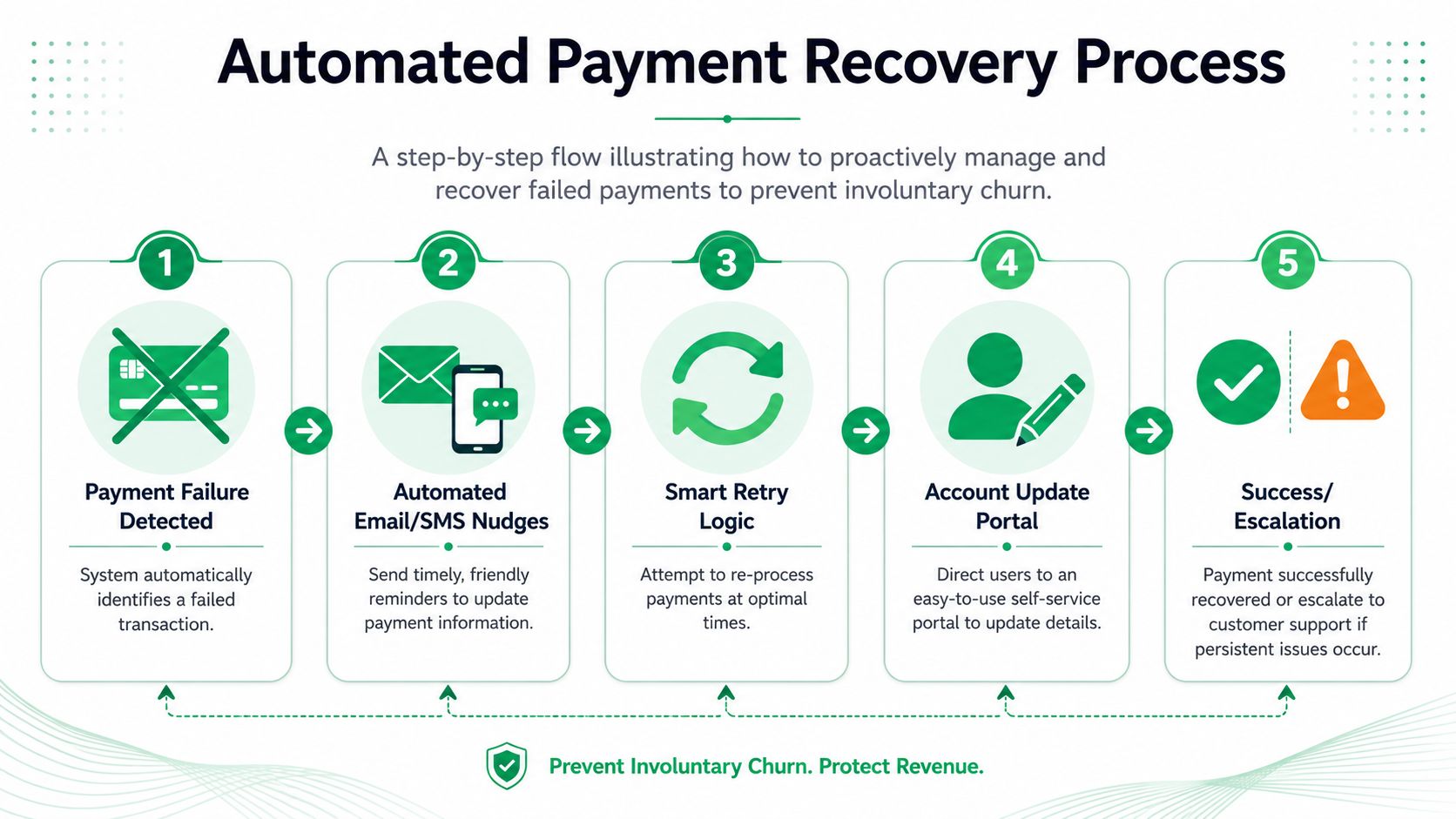
This is often underbuilt, with a single “payment failed” email sent, retries on a fixed schedule, and reliance on the customer noticing. Better systems behave more like a state machine than a reminder blast.
A strong recovery flow should answer:
- What failed, and how many times has it failed?
- Which message does the customer see now?
- Where do they go to fix payment?
- When does a human get involved?
- What happens immediately after recovery?
For issuer-related declines and failed renewals, it helps to remove every extra click between the customer and the update form. If you need a primer on the billing side of that issue, this breakdown of card declined by issuer is worth reviewing.
When to gate access and when not to
Feature gating is the most sensitive part of involuntary churn recovery. Used too early, it feels punitive. Used too late, it fails to create urgency.
Chargebee's analysis notes that success rates jump to 40% when features are temporarily gated only after polite retry attempts, with customers restored immediately upon payment success. It also warns that excessive feature gating before those attempts, or generic retry messages, decrease recovery rates by 10-15%.
That sequence matters. Start with polite reminders and retries. If those fail, limit access in a way that signals action is required. Then restore service immediately once payment succeeds.
Don't punish a good customer for a recoverable billing issue. Apply pressure only after the system has made reasonable attempts to recover the account gracefully.
A practical escalation ladder looks like this:
| Recovery stage | Customer experience | Internal action |
|---|---|---|
| Initial failure | Friendly notice, no service interruption | Queue retries and send update link |
| Repeated failure | Stronger reminder, in-app prompt | Flag account state and monitor |
| Final recovery attempt | Clear urgency, direct update path | Escalate if account is high value |
| Temporary gating | Limited access until resolved | Restore instantly after success |
The companies that reduce churn rate on the billing side aren't necessarily sending more messages. They're sending better-timed messages, tied to clear system states and easy actions.
Measure What Matters Recovered MRR and Experiments
Retention work gets vague fast when teams report only saved accounts or churn reasons. Those numbers are useful, but they don't tell finance, growth, or leadership what drove revenue. The cleaner metric is recovered MRR.
Make recovered MRR your operating metric
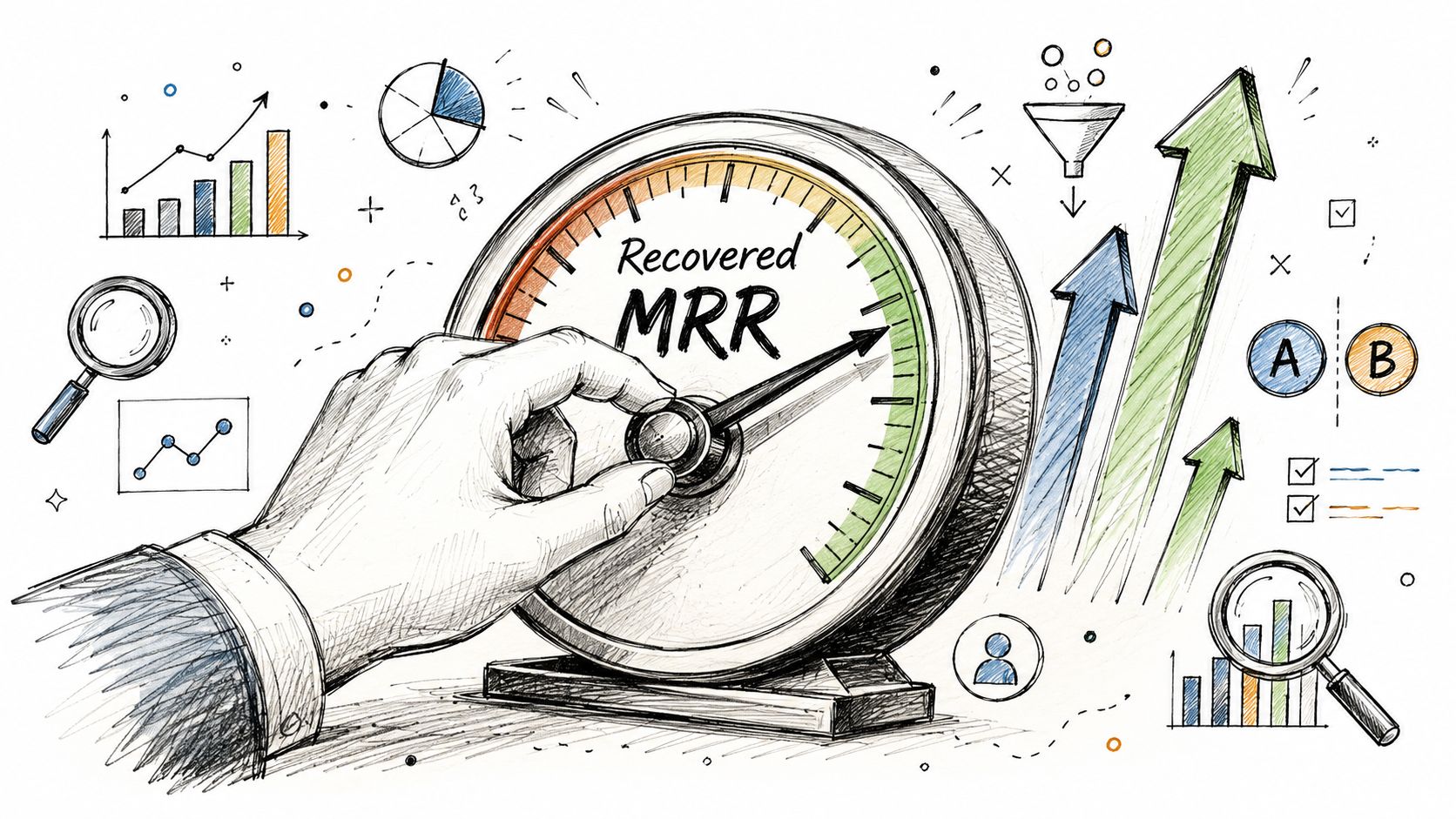
Recovered MRR is the monthly recurring revenue you would have lost, but didn't, because an intervention worked. That intervention might be a pause instead of cancel, a downgrade instead of full churn, a payment recovery, or a support handoff that kept the subscription alive.
This metric changes behavior because it forces attribution. You can no longer say “the cancel flow seems better” or “support did a nice job saving accounts.” You have to connect an outcome to a specific save path or billing recovery action.
Track recovery at the event level:
- Offer shown
- Offer accepted or rejected
- Subscription state after the interaction
- MRR preserved or regained
- Retention outcome after a reasonable observation window
If your team already uses structured marketing or revenue measurement, it helps to align this with a broader revenue attribution model. Churn prevention deserves the same rigor as acquisition attribution.
A simple reporting table can look like this:
| Intervention | What to log | Why it matters |
|---|---|---|
| Pause offer | Accepted, reactivated, later churned | Shows whether pause buys time or creates durable retention |
| Downgrade path | MRR retained after plan change | Separates “saved account” from “retained revenue” |
| Payment recovery | Invoice recovered and subscription restored | Captures billing wins finance can verify |
| Support handoff | Follow-up completed and account status | Helps judge human intervention quality |
Run experiments that your billing data can verify
Once recovered MRR is in place, experimentation gets easier and less political. You're no longer arguing about copy preferences. You're comparing measured outcomes.
Useful experiments include:
- Different save options by reason
- Order of offers in the cancellation flow
- Pause duration choices
- Message copy in payment reminders
- Which accounts get routed to human outreach
Keep the experiments narrow. If you change survey wording, routing logic, and offer design all at once, you won't know what caused the change.
A short walkthrough can help teams think more clearly about measurement and recovery design:
One caution from experience: not every “save” should count the same way. A downgrade that preserves a customer relationship may be healthier than a short-lived discount save that merely postpones churn. That's why revenue retention needs follow-through, not just point-in-time conversion.
When teams ask how to reduce churn rate sustainably, the answer isn't “test more things.” It's “test the few things your billing system can confirm preserved MRR.”
Operationalizing Retention Across Your Team
Retention breaks when it lives in one person's spreadsheet. It works when churn signals move into the systems your teams already use and each team knows what to do next.
Turn churn signals into real-time team workflows
The practical change is simple. Don't let cancellation intent, failed payments, and high-risk feedback sit inside a billing tool waiting for someone to notice. Push them into active workflows.
That usually means:
- Slack alerts for high-value cancellation attempts
- CRM updates when an account enters a risk or recovery state
- Email platform syncs for win-back or education sequences
- Ad audience syncs for recently lost or paused customers
- Product feedback routing tagged by theme and revenue context
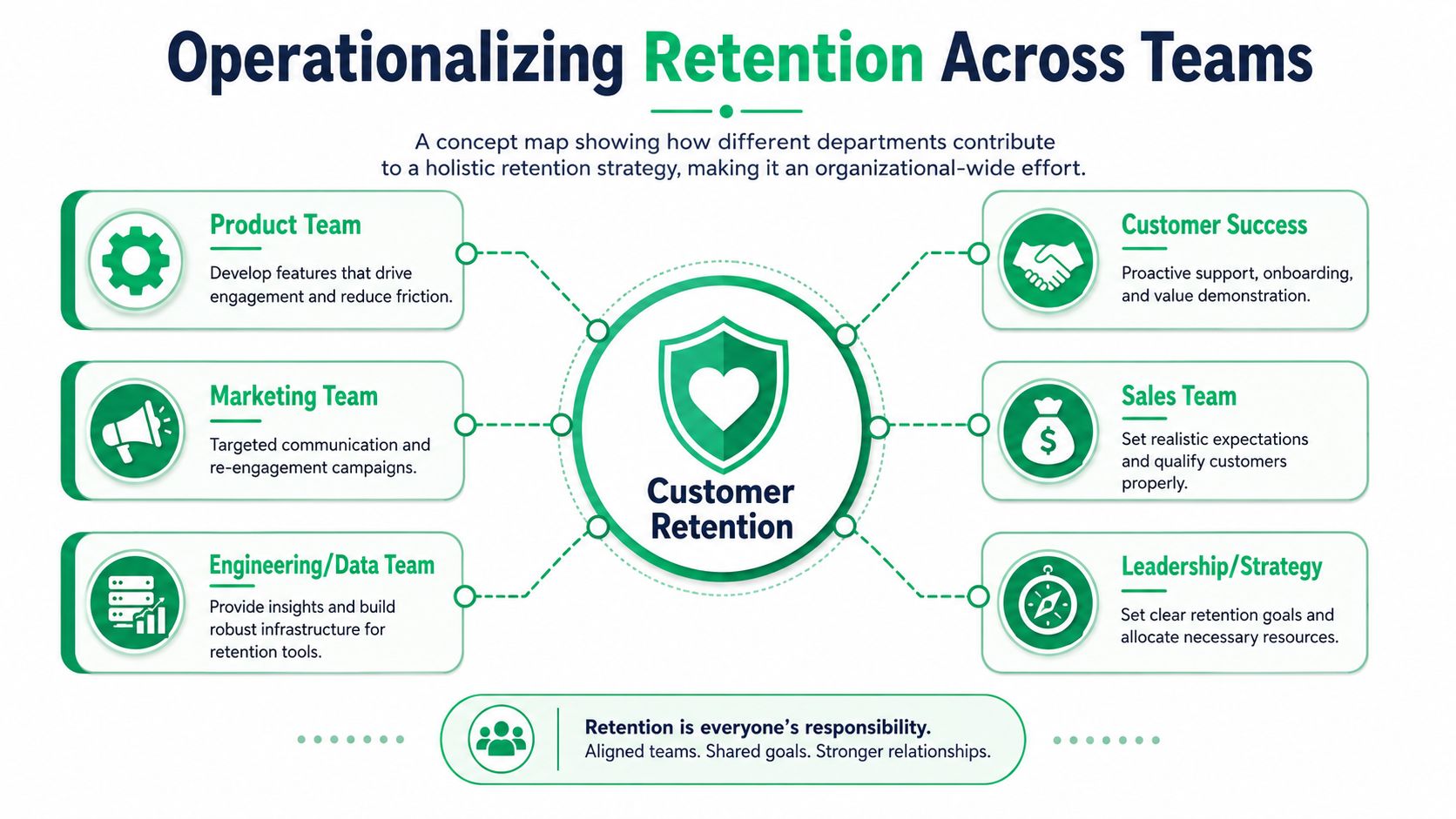
A high-value account that clicks cancel should not disappear into a report. Your customer success lead should know immediately. If a failed payment persists on an important account, finance and success may both need visibility. If a cluster of churn feedback points to one missing feature, product should see that issue weighted by revenue impact, not just ticket count.
Retention gets faster when alerts carry context, not just events.
A weak alert says “Customer canceled.”
A useful alert says “Annual Pro account initiated cancellation, cited missing Salesforce sync, active seats still engaged, open renewal this month.”
That difference determines whether the team can act in minutes or spends half a day gathering context.
Give each team a retention job
Cross-functional retention works best when the responsibilities are explicit.
| Team | Retention responsibility | Output |
|---|---|---|
| Product | Review churn themes tied to lost or at-risk MRR | Prioritized fixes and roadmap input |
| Customer Success | Intervene on high-value risk accounts | Outreach, save attempts, follow-up notes |
| Marketing | Run win-back and education campaigns | Targeted sequences and audience refreshes |
| RevOps | Maintain routing logic and attribution | Clean lifecycle states and reporting |
| Finance | Validate recovered revenue outcomes | Trusted MRR and billing reconciliation |
| Leadership | Set retention priorities and trade-offs | Resourcing and decision speed |
Many teams often overcomplicate things. You don't need a giant retention committee. You need clear triggers, system ownership, and a feedback loop that closes.
A healthy retention operation usually has these properties:
- Signals arrive quickly
- Ownership is obvious
- Interventions are predefined
- Results are measured in MRR
- Feedback returns to product and lifecycle teams
The companies that reduce churn rate consistently don't rely on heroic saves. They build boring, reliable workflows. A cancellation reason gets captured. A route is chosen. A payment failure triggers recovery. A high-value account gets flagged. Product receives categorized feedback. Leadership sees recovered MRR, not just churn anecdotes.
That's what maturity looks like in retention. Not more effort. Better orchestration.
If you want a system that connects Stripe cancellation flows, payment recovery, and recovered MRR reporting in one place, Revcover helps subscription software teams turn churn events into measurable retention workflows without rebuilding core billing logic.