
Reason for Cancellation: Turn Churn Into Recovered MRR

Ayush Soni
Founder, Revcover
On this page
- Decoding the Real Reason for Cancellation
- A practical way to classify root cause
- How to Capture Cancellation Intent In-Product
- Replace the dead-end cancel button
- What to ask in the flow
- What good implementation looks like
- Designing Personalized Save Paths That Recover MRR
- Map the reason to the right intervention
- Examples of save paths that actually fit
- Where teams usually lose MRR
- Measuring and Attributing Your Retention Efforts
- Track revenue outcomes, not just saves
- Include involuntary churn in the same model
- Build one system of record
- Integrating Cancellation Data into Your Growth Engine
- Send the right signal to the right team
- Use cancellation data beyond retention
- Why the closed loop matters
- A Smarter Approach to Subscription Retention
You probably already have a cancellation flow. It might even collect a reason for cancellation. But if that data ends up in a spreadsheet no one checks, or in Stripe metadata no team acts on, it isn't a retention system. It's an archive of lost revenue.
That's the pattern I see most often. A user clicks cancel, selects “too expensive,” leaves, and the company records the event as churn. No segmentation. No save offer tied to the stated reason. No Slack alert for a high-value account. No CRM task for Customer Success. No attribution back to recovered MRR. The result is predictable. Teams debate pricing when the true issue might be weak onboarding, missing feature adoption, or a bug that never made it to the right owner.
A better approach treats the reason for cancellation as the trigger for an operational workflow. Capture intent in-product, route the user into the right save path, push context into the systems your team already uses, and measure revenue outcomes instead of just form completions. That's how cancellation data becomes a closed loop.
Decoding the Real Reason for Cancellation
A customer clicks cancel, selects “too expensive,” and leaves. If that label flows into a dashboard as a pricing problem, the team often makes the wrong call. They test a discount, cut price, or debate packaging, while the actual issue sits somewhere else: weak onboarding, low usage, a missing feature, or a support issue that never got resolved.
That pattern shows up often. Across subscription categories, 63% of subscribers cite cost or “too expensive” as their primary reason for canceling, according to Apprupt's roundup of subscription cancellation statistics. Apprupt also notes that price often stands in for lower perceived value or product frustration, not just budget pressure.
That distinction drives MRR outcomes. A price-sensitive customer might respond to a downgrade, pause, or limited retention discount. A customer who says “too expensive” after barely using the product usually needs a different path, such as onboarding help, a plan change tied to usage, or a fast support follow-up. If you send both groups to the same save offer, recovery rates fall and your reporting gets noisy.
Treat the stated cancellation reason as the opening signal, not the final diagnosis.
The teams that get this right connect two things before they decide what happens next: the answer the customer picked, and the account context around it. Plan, tenure, recent product usage, billing history, support tickets, and lifecycle stage usually explain more than the dropdown alone. For a stronger method for interpreting those patterns, this guide to customer feedback analysis is a useful framework.
A practical way to classify root cause
I prefer a simple operating model: separate the customer's stated reason from the root cause you need to act on.
| Stated reason | Likely root cause | Best next question |
|---|---|---|
| Too expensive | Price sensitivity or low perceived value | “Would a lower plan or pause solve this?” |
| Not using it enough | Weak onboarding, low habit formation, wrong buyer | “What job were you hoping to use this for?” |
| Missing feature | Product gap or expectation mismatch | “Which feature blocked you?” |
| Technical issue | Bug, performance issue, billing friction | “Did support already help with this?” |
| Temporary change | Budget freeze, seasonal use, project ended | “Do you want to pause instead?” |
Cancellation data begins transitioning into a system, rather than remaining a survey.
If someone selects “missing feature,” that answer should do more than populate a chart. It should determine the save path they see, log a structured reason in your CRM, and route the account to the right team. A high-value customer who cites a technical issue may need a Slack alert to support and CSM within minutes. A low-usage customer on a monthly self-serve plan may be better served by a pause offer plus a lifecycle email sequence built to reactivate usage later.
Harmonize makes a similar point in its diagnostic framework. It notes that price is the most frequently cited reason for voluntary cancellation, appearing in 35 to 40% of cases, in Harmonize's diagnostic framework for subscriber cancellation. The useful takeaway is operational: repeated “too expensive” responses without a recent pricing change often point to value perception, not pure affordability.
That is the test I trust. If churn jumps right after a price increase, pricing likely is the issue. If “too expensive” keeps showing up across stable pricing, look at activation, adoption, feature fit, and support history before touching packaging.
The goal is not to collect better cancellation reasons for a slide deck. The goal is to turn each reason into the next best action, recover more MRR, and feed cleaner signals into the rest of the growth engine.
How to Capture Cancellation Intent In-Product
Replace the dead-end cancel button
Most default cancel experiences are too thin to be useful. The user clicks “Cancel subscription,” confirms once, and disappears. You get a churn event, maybe a single dropdown value, and almost no usable context.
A stronger flow intercepts intent at the moment the user tries to leave. Not to block them, but to ask one focused question, route them based on the answer, and still make cancellation straightforward if that's the right outcome.
The basic structure is simple:
- User clicks cancel
- Flow asks for reason
- System checks account context
- User sees a reason-specific option
- Outcome is logged and pushed downstream
That's enough to turn a cancellation page into an operational surface.
What to ask in the flow
Don't ask for everything. Ask for the minimum needed to decide the next step.
A good in-product cancellation survey usually has three layers:
- Primary reason selection: Keep the choices broad enough to segment reliably. Price, lack of use, missing feature, technical issue, switched to competitor, temporary pause, other.
- Reason-specific follow-up: If they pick “missing feature,” ask which feature. If they pick “too expensive,” ask whether a lower-cost option would help.
- Optional freeform text: Within this section, you'll find the language product, support, and marketing teams need.
The trap is making the flow feel like an interrogation. Long forms reduce completion quality. The user wants to leave. Respect that. Use one question per step, keep the options clean, and show a visible path to continue cancellation.
The best cancellation flows don't hide the exit. They earn one extra response by making each question feel relevant.
What good implementation looks like
The in-product part only works if the data is captured before the subscription is lost and attached to the subscription record that matters. For SaaS teams using Stripe, that usually means the cancellation flow needs to sit alongside the billing workflow rather than in a disconnected survey tool.
A practical implementation should do four things well:
- Capture the event at intent time: Don't send a post-cancellation email survey and expect strong signal quality.
- Write structured and unstructured data together: The selected reason is useful. The freeform explanation is where root cause often shows up.
- Use live account context: Plan, recent product usage, MRR value, support tickets, and billing status should shape the next screen.
- Log every branch: Accepted offer, declined offer, abandoned flow, clean cancellation, and support handoff should all be measurable outcomes.
Here's the difference between weak and strong setup:
| Weak setup | Strong setup |
|---|---|
| Single static cancel page | Dynamic flow based on reason and account context |
| One generic “Why are you leaving?” prompt | Reason-specific branching questions |
| Survey data lives in a form tool | Data tied to subscription and revenue records |
| No downstream actions | Alerts, CRM sync, support routing, win-back audiences |
| Reports on cancellations only | Reports on recovered MRR and post-save retention |
If your cancellation flow can't tell your team which reasons produced accepted offers, which reasons led to support escalations, and which reasons resulted in clean churn, it's still just a form.
Designing Personalized Save Paths That Recover MRR
A user clicks “cancel,” selects “too expensive,” and lands on the same 20% discount every other canceling account sees. They were underusing the product, would have accepted a downgrade, and now you have two problems. You gave away margin, and you learned almost nothing.
Good save paths are built as a system, not a coupon screen.
Map the reason to the right intervention
The job is to convert a cancellation reason into the next best action. That means matching the in-product response to both the stated friction and the account's revenue context.
“Too expensive” is a good example. Sometimes it means real budget pressure. Sometimes it means the account never reached value. Sometimes it means the current plan is wrong for how they use the product. Those cases should not get the same path.
I'd make the routing logic explicit. If usage is low and the account sits on a higher-tier plan, show a downgrade first. If usage is strong but seats dropped after a team change, show a seat reduction or monthly plan option. If the account has high MRR and recent support friction, skip self-serve offers and route the user to a fast human review.
That is how cancellation data starts working like a retention engine. The reason selected in-product shapes the offer. The offer accepted or declined triggers operational follow-through. The account outcome then feeds reporting, so the team can see which paths preserved MRR. If you need that reporting layer, build it on a revenue attribution model for retention programs rather than a simple “offer accepted” dashboard.
Examples of save paths that actually fit
The strongest flows connect three things cleanly. The cancellation reason. The save offer. The downstream action.
- Price complaint with moderate usage Start with a downgrade, not a blanket discount. If the user accepts, update the subscription immediately, write “retained via downgrade” to the CRM, and post a Slack alert for the account owner if MRR is above your handoff threshold. If they decline, offer a short pause or a time-boxed discount only if that segment has shown decent post-save retention.
- Low usage or weak activation Money off usually masks the problem. Offer a 30-day pause, a lower-usage plan, or a guided restart tied to the role they selected during onboarding. If they choose help, create a Customer Success task with their recent usage data attached and trigger an email sequence built around the missing setup steps.
- Missing feature Don't try to buy back a product gap with a discount. Ask which capability is missing, then branch. If there is a workaround, route to sales or support with context. If there is no workaround, log the request against the account record, attach MRR and plan tier, and push it into the product feedback queue so product and growth can see revenue at risk.
- Technical issue or unresolved bug This path should create action, not just collect sentiment. Open or append a support ticket from the cancellation flow, include the free-text explanation, and let the user choose between canceling now, pausing for a short window, or waiting for support follow-up. For larger accounts, send the alert to Slack and assign an owner in the CRM so no one has to scrape survey exports later.
A personalized path earns its keep only when the system behind it is wired up. If a user accepts a pause but billing is not updated, or asks for help but no task gets created, the save flow is just UI.
Where teams usually lose MRR
The common failure mode is overusing discounts because they are easy to launch and easy to report. That creates short-term saves and weak long-term retention.
A few patterns usually drag performance down:
- One default offer for every reason: You lose margin and hide which frictions are recoverable.
- Support as the answer to everything: High-touch interventions are expensive and unnecessary for simple downgrade or pause cases.
- Too many branching questions: Completion rates fall fast when users feel trapped in a survey instead of getting a clear option.
- No operational handoff: Accepted offers need subscription changes. Escalations need owners. Feature requests need to land in the systems product and sales already use.
There is also a point where you should let the account go. Poor-fit customers, unsupported use cases, and accounts that only stay on deep discounts often look better in “saved accounts” reports than they look in net revenue retention.
The best cancellation flows feel simple to the user because the complexity sits behind the curtain. One relevant option. One clear next step. Clean data flowing into billing, Slack, and CRM so the team can recover MRR and prove which save paths are worth keeping.
Measuring and Attributing Your Retention Efforts
A user selects “too expensive,” accepts a 3-month downgrade, and stays active. Another selects the same reason, takes a 20% discount, and churns the day the promo ends. Both count as saves in a loose report. Only one preserved MRR in a way the business should keep funding.
That is the standard to hold this section to. Attribution has to connect cancel intent, offer exposure, user response, subscription state change, and retained MRR over time. If any link is missing, retention starts looking better in the dashboard than it does in the P&L.
Track revenue outcomes, not just saves
The core mistake is giving full credit at offer acceptance. Finance does not care that a modal converted. Finance cares whether the account stayed, on what plan, at what MRR, for long enough to count.
A workable scorecard usually includes:
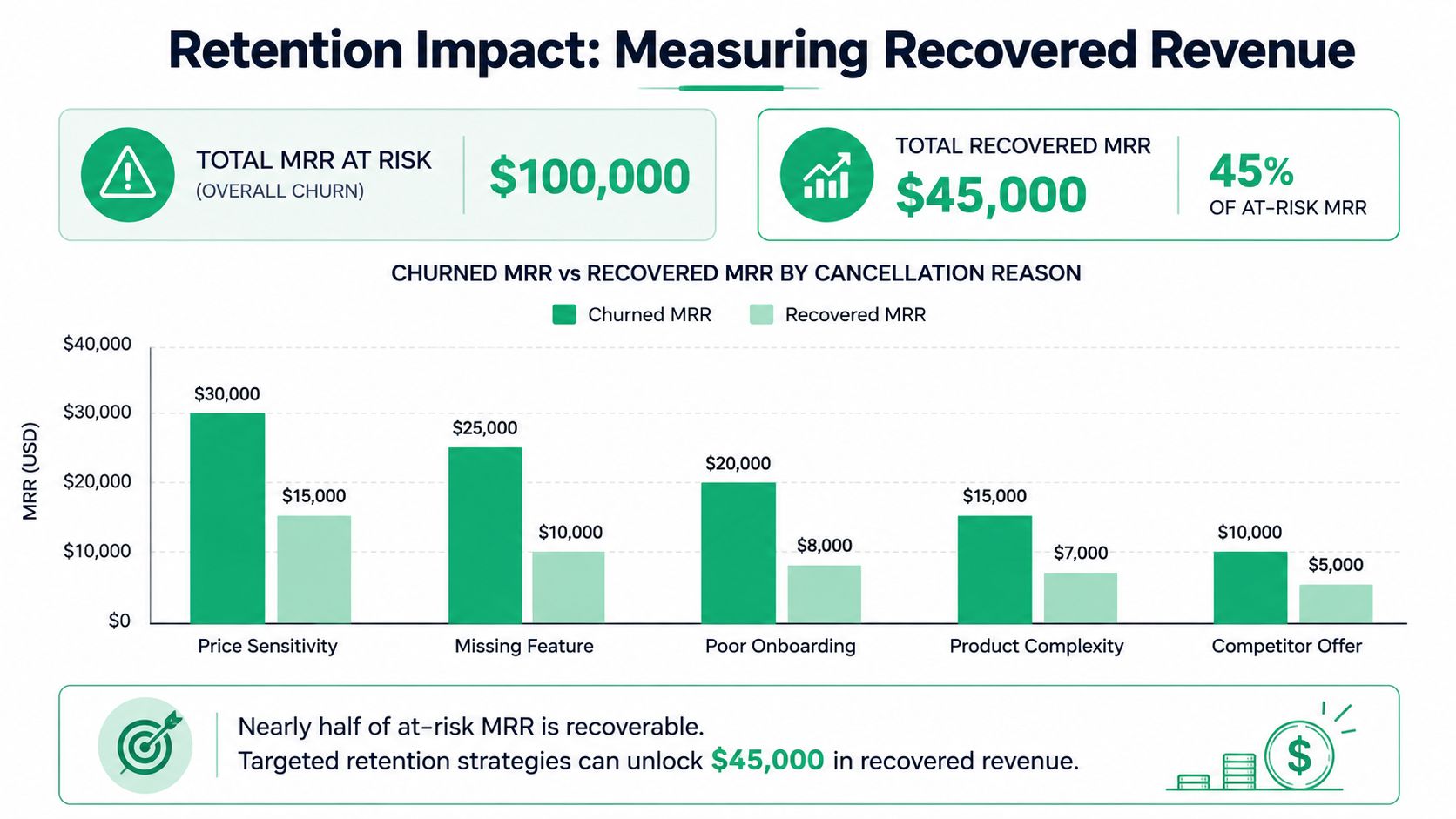
- Recovered MRR: MRR preserved because the customer moved to a pause, downgrade, annual plan, or another retained state instead of full cancellation.
- Offer acceptance rate by cancellation reason: Which save paths convert for “too expensive,” “missing feature,” “not using enough,” or “temporary pause.”
- Post-save retention rate: Whether the account is still active 30, 60, or 90 days later, based on your billing cycle and finance rules.
- Abandoned cancellation sessions: Accounts that entered the flow, saw an offer, and left without completing the process.
- Clean churn by reason: Cancellations that went through with no accepted intervention.
Use a retention window that matches the offer. A pause may need a reactivation checkpoint. A downgrade should be measured on retained MRR after the lower plan takes effect. A discount should be judged after the discount period ends. That is how teams avoid over-crediting aggressive offers that pull revenue forward but do not improve retention.
For attribution logic, keep the rule tight. Credit the save path when it caused the subscription change and the account stayed active long enough to qualify as retained under your finance policy. If leadership is still debating first-touch versus last-touch style rules for retained revenue, this guide to revenue attribution models is a good reference point.
Include involuntary churn in the same model
Retention reporting breaks down when voluntary cancellation sits in one dashboard and failed payments sit in another. The customer does not care which team owns the workflow. The CFO definitely does not.
One system should show how much MRR the retention engine preserved across both cases. That means a failed renewal, a recovered card, a saved cancellation, and a downgrade should all roll into the same monthly view.
RevenueCat reports that insufficient usage is the leading cause of churn in mobile apps at 37.02% in its analysis of subscription app churn reasons (https://www.revenuecat.com/blog/growth/subscription-app-churn-reasons-how-to-fix/). The same analysis says billing errors account for up to 28% of involuntary churn on Google Play (https://www.revenuecat.com/blog/growth/subscription-app-churn-reasons-how-to-fix/). The practical takeaway is straightforward. Usage-related churn needs save paths tied to activation and education. Billing-related churn needs payment recovery flows and clear escalation rules.
That shared view also helps settle budget fights. If a cancellation reason drives low recovery and low downstream retention, stop feeding it discounts. If payment recovery is bringing back high-intent users with strong 60-day retention, put more effort there.
Build one system of record
The reporting layer should answer operational questions without manual cleanup from ops or finance.
| Question | What the system should show |
|---|---|
| Why are customers trying to leave? | Reason mix, freeform themes, plan tier, tenure, and current MRR |
| Which interventions work? | Offer shown, offer accepted, subscription change applied, and retained status after the checkpoint window |
| How much revenue was preserved? | Recovered MRR by reason, offer type, segment, and billing status |
| Where is action needed now? | Open payment recovery cases, unresolved support escalations, and high-MRR accounts still at risk |
The closed loop matters here. If a customer selects “missing feature,” accepts no offer, and churns, that reason should still be measurable against future product work. If a customer selects “budget,” accepts a downgrade, and support gets a Slack alert to confirm the new plan is live, the final retained MRR should map back to that exact intervention chain. Reason. Offer. System action. Revenue result.
If you cannot trace that path end to end, you do not have attribution. You have activity.
Integrating Cancellation Data into Your Growth Engine
Cancellation data is wasted when it stays inside the retention tool. Its value shows up when product, success, support, sales, and lifecycle marketing can all act on it without waiting for a weekly report.
That's the difference between passive analytics and a growth system. The moment someone selects a reason for cancellation, the business should know who needs to respond, what context they need, and what action should happen next.
Send the right signal to the right team
Not every cancellation event deserves the same treatment. Routing matters.
For example:
- High-value account with a product complaint: Send a Slack alert to Customer Success and product leadership with plan, MRR, stated reason, and the user's freeform note.
- Low-usage account asking to cancel for value reasons: Add the account to a lifecycle sequence focused on adoption and practical use cases.
- Feature-related churn from multiple accounts: Sync tagged feedback into the CRM or product review process so the pattern is visible beyond support.
- Billing failure with active product usage: Trigger payment recovery messages, then escalate internally only if recovery stalls.
That routing turns the reason for cancellation into an operating signal rather than a dashboard label.
Use cancellation data beyond retention
The downstream uses are broader than teams typically understand.
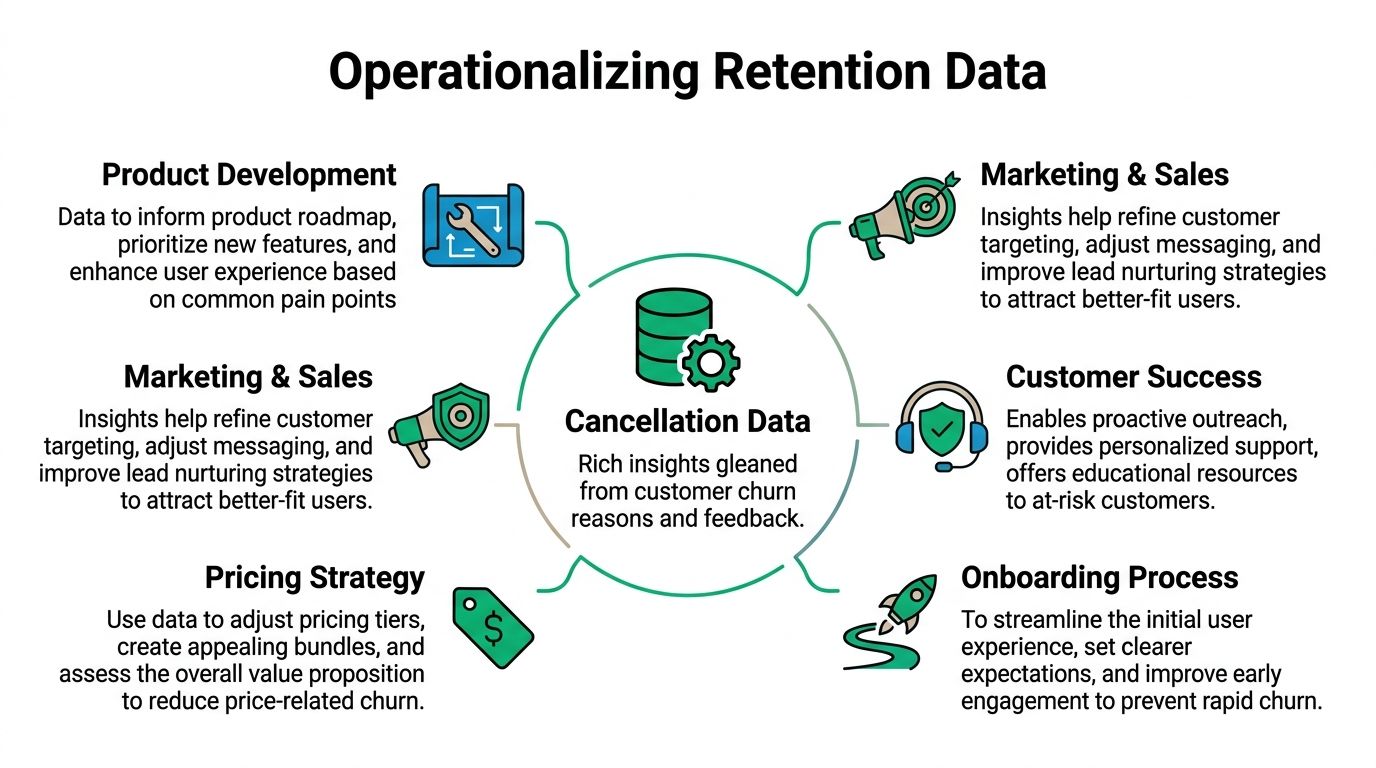
Product managers can use cancellation themes with revenue context to prioritize fixes that affect paying customers, not just loud requests. Marketing teams can tighten acquisition messaging when churn reasons show expectation mismatch. Sales teams can see competitor mentions and objection patterns from real lost accounts. Success teams can identify which early-warning signals tend to appear before a user finally cancels.
Here's where closed-loop systems become more powerful than one-off saves:
- Slack: Real-time alerts for urgent churn risk and accepted high-value saves
- CRM: Reason tags, outcome tags, and follow-up tasks for account owners
- Email platform: Win-back sequences based on cancellation reason and prior plan
- Ads platforms: Audience sync for recently churned users by segment, not just a generic lost-user pool
- Product feedback workflows: Feature and bug themes enriched with subscription context
A cancellation reason should travel. If it stops at form submission, the company learns too slowly.
Why the closed loop matters
This loop changes how teams make decisions. Instead of debating churn in aggregate, they can inspect which reason clusters are growing, which offers recover real MRR, and which issues need product intervention instead of more discounting.
It also improves speed. When a user flags a bug during cancellation and support sees it immediately, the team can still recover the relationship. When multiple accounts cite the same missing feature, product gets evidence with revenue attached. When marketing sees that certain acquisition channels produce low-usage churn, spend gets reallocated.
That's what a mature retention engine looks like. Not a prettier cancel page. A system that converts intent signals into action across the company.
A Smarter Approach to Subscription Retention
Strong retention work doesn't start with trying to stop every cancellation. It starts with understanding why the customer wants to leave, what intervention fits that situation, and whether the outcome preserved healthy revenue.
That's why the reason for cancellation matters so much. It's the entry point into a broader operating system. Capture it inside the product when intent is fresh. Interpret it with account context instead of taking labels at face value. Route users into save paths that match the underlying problem. Measure recovered MRR, not just clicks on offers. Then send the insight into Slack, the CRM, support workflows, and product planning so the business gets smarter after every churn event.
If you're working on reducing subscription loss, don't settle for a cancellation survey that produces static charts. Build the loop. The next canceled subscription should tell you something useful, trigger the right workflow, and improve the odds of saving the next one.
If you want a broader playbook for retention strategy beyond the cancel flow itself, this guide on how to reduce churn rate is worth reading.
Revcover helps subscription software teams turn cancellation intent into a measurable retention engine. It connects with Stripe, captures churn reasons in-product, routes users into personalized save paths, handles payment recovery, and ties outcomes back to recovered MRR. If you want a retention system that goes beyond a default cancel page, explore Revcover.