
Natural Language Search: A Practical Guide for SaaS

Ayush Soni
Founder, Revcover

On this page
- What If You Could Understand Every Customer Comment
- Why manual tagging misses the real signal
- What better looks like
- From Keywords to Intent Understanding the Shift
- Why this shift matters in SaaS feedback
- Keyword search vs natural language search
- Where teams get confused
- How Natural Language Search Actually Works
- The production pipeline behind the scenes
- What the system extracts
- Where embeddings and vector search fit
- What works and what breaks
- Unlocking Insights with SaaS Use Cases
- Churn analysis that supports action
- SaaS teams can use the same system in multiple workflows
- Where the business value shows up
- Building a Churn Feedback Search Engine
- Start with structured context around unstructured text
- Build retrieval around churn questions, not generic search
- Design the workflow before you scale the index
- What to avoid in rollout
- Measuring the Success of Your NLS System
- Technical checks that matter
- Business outcomes that prove value
- The Future is Understanding Not Just Finding
Your cancellation survey says “too expensive.” A support ticket from the same account says “missing Salesforce sync.” A success manager notes “team never adopted the workflow.” Stripe shows the customer was on a high-value plan. Somewhere in those fragments is the complete churn story, but many teams still try to pull it together with CSV exports, filters, and manual tagging.
That breaks down fast. Freeform feedback is where customers tell you what went wrong, but it's also where analysis gets messy. People use different words for the same issue. They mention two problems in one sentence. They refer to competitors indirectly. They describe frustration without ever naming the feature.
That's why natural language search matters. It turns raw comments, churn notes, support transcripts, and cancellation responses into something your team can query in plain English. It also lets you connect what customers said to what the business needs to do next: fix a product gap, route a save offer, trigger follow-up, or prioritize the revenue at risk. The broader shift is real too. The NLP market that underpins natural language search is projected to grow from roughly $11 billion in 2020 to around $439.85 billion by 2030, according to Envive's market summary on natural language search statistics.
For SaaS leaders focused on retention, this isn't just a search improvement. It's a way to treat customer language as operating data. And if you care about expansion and retention efficiency, that has a direct relationship to net dollar retention in subscription businesses.
What If You Could Understand Every Customer Comment
A familiar scene plays out in a lot of SaaS companies. A product manager exports cancellation feedback from Stripe, appends notes from Intercom and HubSpot, then starts tagging rows by hand. “Pricing.” “Missing feature.” “Bad onboarding.” “Other.” By the end, the labels look neat, but clarity remains elusive.
The problem isn't effort. The problem is the shape of the data.
Customers rarely hand you a clean category. They write things like “We liked it but couldn't get the reporting our finance team needed,” or “Switching because our agency already uses another platform,” or “Just too much work for a small team.” Those comments contain product issues, persona signals, urgency, and competitive context. A spreadsheet can store all of that, but it can't understand it.
Why manual tagging misses the real signal
Manual review works when the feedback volume is low and the stakes are modest. It fails when you need consistent answers across hundreds or thousands of comments. Different team members classify the same statement differently. New themes appear mid-quarter. Old taxonomies stop fitting what customers are saying.
A simple keyword filter doesn't solve that either. If you search for “integration,” you may miss “couldn't connect to Salesforce.” If you search for “too expensive,” you may miss “hard to justify for our team size.”
Practical rule: If your team has to guess the exact phrase a customer used, you don't have a search system. You have text storage.
What better looks like
Natural language search changes the question from “Which words are in this comment?” to “What does this customer mean?” That's the leap that turns messy churn notes into a usable decision layer.
With the right setup, a growth lead can ask for comments about onboarding friction, hidden competitor mentions, pricing objections from smaller accounts, or feature gaps tied to high-value cancellations. The output isn't just easier analysis. It's faster action:
- Product teams can spot repeated complaints before they become roadmap politics.
- Retention teams can identify which save paths fit which type of account.
- Leadership can tie themes to revenue impact instead of debating anecdotes.
That's the difference between collecting feedback and operationalizing it.
From Keywords to Intent Understanding the Shift
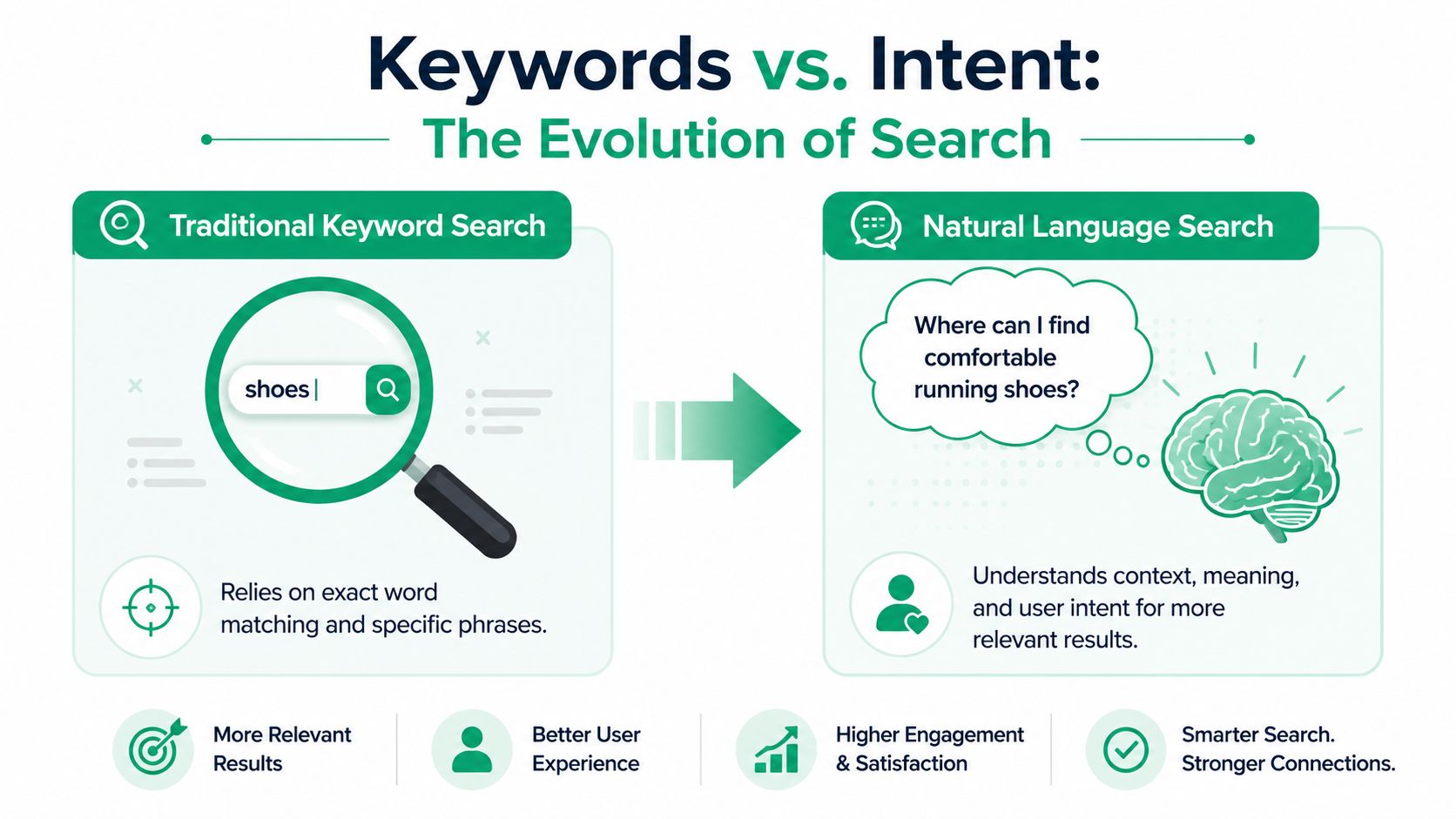
Traditional search acts like a literal-minded librarian. Ask for a book using the exact title and you'll probably get it. Phrase the request differently, use a synonym, or describe the problem instead of naming it, and the system starts to wobble.
Natural language search behaves more like an experienced librarian. It interprets what you mean, not just what you typed. If a customer says “the dashboard is confusing,” the system can understand that this belongs near comments like “reporting UI is hard to use” or “analytics layout makes no sense,” even though the words don't match exactly.
Google's shift captures why this matters. By 2020, Google reported that its natural language understanding systems could correctly interpret more than 80% of conversational search queries in English, a clear marker that search had moved beyond pure keyword matching and toward intent interpretation, as described in BrightEdge's overview of natural language processing in search.
Why this shift matters in SaaS feedback
In churn analysis, wording is inconsistent by default. One customer says “buggy.” Another says “unreliable.” Another writes “we couldn't trust it for client work.” A keyword engine treats those as separate islands. A natural language system can treat them as variants of the same underlying concern.
That has practical consequences:
- You surface broader themes sooner because synonyms and paraphrases cluster together.
- You reduce blind spots because teams don't need to predefine every possible phrase.
- You ask business questions in plain language instead of learning a brittle search syntax.
Keyword search vs natural language search
| Aspect | Traditional Keyword Search | Natural Language Search |
|---|---|---|
| Query style | Exact words or short phrases | Full questions, descriptions, and plain English |
| Matching logic | Literal term matching | Semantic and intent-based matching |
| Handling synonyms | Often weak unless manually configured | Better at connecting related meanings |
| Tolerance for messy phrasing | Low | Higher |
| Best use case | Known-item lookup | Discovery, analysis, and ambiguous requests |
| Churn feedback value | Finds obvious mentions | Finds patterns across varied customer language |
Keyword search helps when you already know the term. Natural language search helps when customers don't use your taxonomy.
Where teams get confused
A lot of teams think natural language search means “chat with your data.” Sometimes it does. But the core value is more basic and more useful. It lets your business ask better questions of unstructured text and get back relevant sets of evidence.
That distinction matters. If you're working with churn notes, support conversations, or cancellation forms, you don't need a flashy interface first. You need a system that can connect meaning across inconsistent language. That's what moves feedback analysis from ad hoc review to repeatable operating process.
How Natural Language Search Actually Works
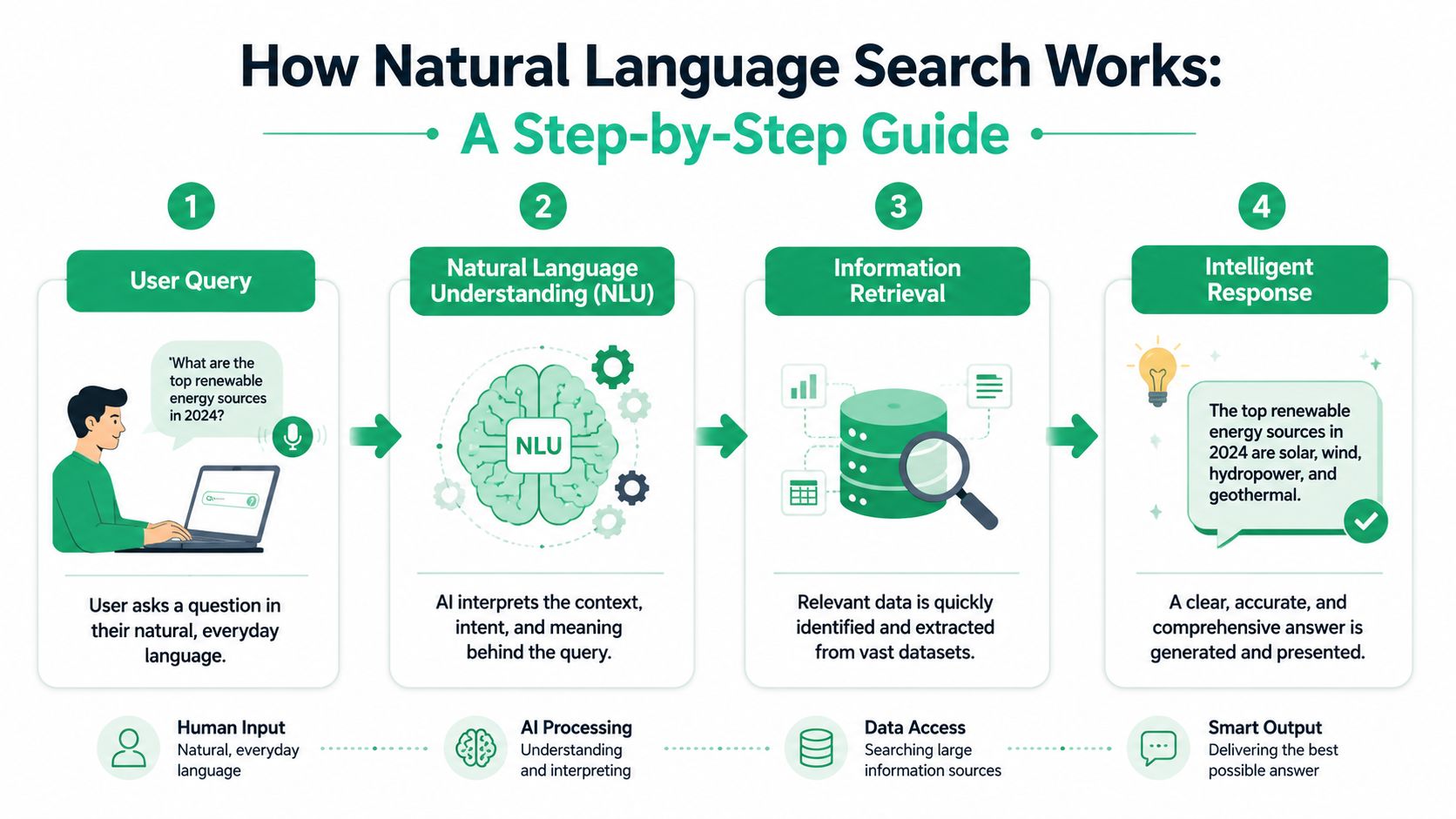
A good natural language search system turns a messy business question into a query your data stack can execute and your team can trust. For churn analysis, that means a retention lead can ask, “Which canceled accounts over $20k mentioned onboarding friction in the first 60 days?” and get back evidence, not a vague summary.
A browser looks for matching words on a page. Natural language search interprets meaning, applies business constraints, retrieves the right records, and returns results people can verify.
The production pipeline behind the scenes
In production, the strongest systems use a two-stage architecture. First, a language layer parses the request into structured predicates. Then a query planner maps those predicates to the right retrieval method, whether that is SQL filters, full-text search, vector retrieval, or a combination. ZoomInfo Engineering's write-up on natural language based search explains why this design performs better than letting a model generate raw database logic in one pass.
That separation matters for revenue work. If the goal is to find churn reasons tied to a segment, a contract size, or a period before renewal, the system needs to understand the question and apply hard filters consistently. A fluent answer with weak retrieval is expensive because teams make roadmap and retention decisions from it.
What the system extracts
A well-built pipeline usually pulls four things from the query:
- Entities such as product areas, competitors, integrations, plans, or stakeholder roles
- Constraints such as date ranges, account tiers, lifecycle stage, cancellation reason, or region
- Intent such as lookup, comparison, summarization, clustering, or root-cause analysis
- Output shape such as raw comments, grouped themes, counts, or revenue-weighted results
Many teams make a smart trade-off here. Instead of asking an LLM to do every step, they convert the request into an intermediate JSON-like structure that can be logged, tested, and translated into downstream queries. That adds a little engineering overhead, but it makes failure modes visible. You can see whether the system misunderstood “enterprise,” missed the date filter, or retrieved the wrong comments.
Where embeddings and vector search fit
Structured filters alone are not enough for churn feedback because customers rarely describe the same problem the same way. One account says, “Too expensive for our stage.” Another says, “Couldn't justify the cost.” A third says, “Budget was the blocker.”
Embeddings help map those statements into similar semantic space, so the system can retrieve related comments even when no exact phrase overlaps. Vector search handles that retrieval at scale. For SaaS teams, this is the difference between finding a few obvious complaints and finding the full revenue pattern behind pricing pressure, onboarding failure, or missing integrations.
The best systems do both. They use semantic search to find meaning, then apply metadata filters to keep results tied to the business question.
What works and what breaks
The cleanest implementations usually share the same traits:
- Constrain the domain. The model should know your schema, field names, approved filters, and common business terms.
- Keep business context close. Product glossary terms, segment definitions, and account metadata reduce ambiguity.
- Log the intermediate representation. Teams need to inspect how the query was interpreted before they trust the output.
- Return evidence with the result. Raw comments, matched snippets, and account context matter more than a polished paragraph.
Weak implementations fail in predictable ways. They treat churn feedback like a generic chatbot task, skip schema control, and let the model infer too much. The output sounds credible, but no one can tell which comments support the conclusion or whether high-value accounts were overrepresented.
For churn recovery, reliability wins. Product, support, and retention teams need a system that surfaces the right feedback fast enough to act on it, and clearly enough to defend the decision.
Unlocking Insights with SaaS Use Cases
A revenue team usually feels the pain first. Churn comments pile up in a cancellation form, CSM notes, support threads, and call transcripts. Leadership wants a clear answer to a simple question: what is driving avoidable revenue loss, and which issues are worth fixing first?
Natural language search matters here because churn feedback is messy, short, and inconsistent. One customer says “too expensive.” Another says “couldn't get the team using it.” A third says “went back to spreadsheets.” Those comments point to different problems, different owners, and different recovery paths. If search can only match keywords, those patterns stay fragmented.
Churn analysis that supports action
Sentiment is a starting point, not an operating model. “Negative” does not tell a retention team whether to revisit packaging, fix onboarding, improve integrations, or coach success managers on expectation setting.
Natural language search helps teams query churn feedback in terms the business can act on:
- Feature gap discovery
Find comments about missing reporting, permissions, SSO, or integration coverage even when customers describe the problem in their own words. - Competitor intelligence
Surface comments that signal replacement behavior, side by side evaluation, or a return to an incumbent tool. - Pricing friction
Separate true price objections from comments that describe low adoption or weak perceived value. - Usability patterns
Group statements about confusion, complexity, or broken workflows that would otherwise be scattered across inconsistent tags.
At this point, the trade-off becomes clear. Broad semantic retrieval gives better coverage, but it can also blur distinct causes if teams do not anchor results to account context. A “price” complaint from a fully adopted enterprise account means something different from the same complaint on a trial account with no usage.
SaaS teams can use the same system in multiple workflows
Retention is the highest-value use case, but it is not the only one. Support leaders can search for recurring issue patterns without relying on perfect ticket tagging. Success teams can review renewal and cancellation comments tied to adoption problems, training gaps, or stakeholder misalignment. Product teams can examine recurring requests by segment instead of reading isolated quotes in a spreadsheet.
The shared benefit is speed with evidence. Teams spend less time normalizing language by hand, and more time reviewing the raw comments behind a pattern before they decide what to change.
If your team is sorting churn feedback, it also helps to separate retention analysis by churn type. Voluntary cancellation comments and failed payment events produce very different signals. Our guide to voluntary vs. involuntary churn explains why that distinction matters before you build reporting or search workflows around it.
Where the business value shows up
The strongest SaaS use cases tie language to a decision and an owner.
| Use case | What natural language search helps uncover | Why it matters |
|---|---|---|
| Cancellation feedback | Root causes behind churn comments | Helps retention, product, and finance prioritize fixes with revenue impact |
| Support analysis | Repeated issue themes across tickets | Reduces triage noise and identifies systemic defects |
| Product research | Emerging requests and pain patterns by segment | Improves roadmap decisions with direct customer evidence |
| Competitive insight | Mentions of alternative tools and switching triggers | Sharpens positioning, save plays, and win-back messaging |
A lot of content on natural language search stays at the “better search” level. For SaaS operators, the bigger opportunity is turning churn feedback into a system teams can query, verify, and use to recover revenue.
The useful question is simple. Can your team turn messy customer language into decisions that reduce churn and protect expansion revenue?
Building a Churn Feedback Search Engine
A customer clicks “cancel,” leaves a blunt comment about pricing, mentions a missing integration, and disappears. In many SaaS companies, that signal ends up split across billing events, a form response, support notes, and a CSM's memory. Revenue teams lose the thread before anyone can use it.
That is the problem a churn feedback search engine should solve.
The goal is not better search in the abstract. The goal is to help product, retention, and finance teams find the patterns behind cancellations quickly enough to change save offers, fix product issues, and recover revenue. That requires more than indexing a pile of comments. It requires a system built around cancellation decisions.
Start with structured context around unstructured text
Freeform feedback gets valuable when it is tied to account context. A comment like “not worth it anymore” means very different things from a high-ACV account with low adoption than it does from a small customer hit by a budget freeze.
For churn analysis, each record should include the comment and the business context around it:
- Feedback text from cancellation prompts, exit surveys, or follow-up replies
- Account metadata such as plan, tenure, contract value, and billing status
- Product signals like feature adoption, usage depth, and recent activity
- Outcome data including whether the customer canceled, downgraded, paused, or accepted a save offer
Teams usually make the first expensive mistake. They dump every text source into one index and call it insight. In practice, unreliable records create noisy themes, weak trust, and bad prioritization. Start with the sources closest to the churn event, then expand.
If your data model does not clearly separate customer choice from payment failure, fix that before you build reporting or search workflows. Voluntary and involuntary churn require different analysis paths, and mixing them will blur the causes you need to act on.
Build retrieval around churn questions, not generic search
The retrieval layer should answer the questions your operators already ask:
- Which cancellations mention missing integrations from high-value accounts?
- Where are pricing objections masking low adoption?
- Which competitor mentions are increasing in a specific segment?
- What reasons appear before a downgrade versus a full cancellation?
Those questions sound simple. They are not. Customers rarely use your internal labels, and they often describe symptoms instead of root causes. A useful system has to connect “too hard to set up,” “my team never adopted it,” and “we could not get it working with Salesforce” without flattening them into one vague bucket.
I have seen teams rush to the interface layer here and add a chatbot before they have retrieval quality under control. That usually produces confident summaries built on mixed records. The better sequence is clear taxonomy, clean metadata, solid semantic retrieval, then an interface that helps people inspect the underlying comments.
For churn work, the search layer should reliably recognize a few categories of business language:
- Feature gaps and blocked workflows
Customers describe the job they could not complete, not your product terminology. - Competitive switching signals
This includes named competitors and indirect phrases like “went back to our old tool” or “combined this into another platform.” - Pricing and value objections
“Too expensive” is obvious. “Couldn't justify renewal” or “budget got cut” may belong in a different operational bucket depending on usage and account health. - Adoption and complexity friction
These comments often overlap with onboarding, support, and product design. Search needs enough nuance to keep those causes separate when the business response differs.
Design the workflow before you scale the index
A churn feedback search engine becomes valuable when someone can act on the result. Product needs evidence for roadmap decisions. Retention needs language for save plays. Finance needs a clearer view of preventable versus unavoidable revenue loss.
That means every result should support three follow-up steps. Verify the matched comments. Quantify the revenue attached to the theme. Route the issue to an owner.
Without that workflow, teams get an attractive repository of comments and no operating system around it.
What to avoid in rollout
A few rollout mistakes show up repeatedly:
- Do not trust early clusters at face value. Broad themes like “pricing” or “usability” often hide several different problems with different revenue impact.
- Do not review summaries without source comments. Leaders need to inspect the actual cancellations behind a theme before they act on it.
- Do not separate search from intervention. If the output cannot trigger a save tactic, a product fix, or a segment-level follow-up, the system will stall.
- Do not optimize for coverage before credibility. A smaller set of clean, high-confidence churn records is more useful than a larger index full of ambiguous text.
The strongest churn feedback search engines help teams move from raw comments to confident decisions. That is how natural language search stops being a feature and starts contributing to retention and revenue.
Measuring the Success of Your NLS System
A natural language search system isn't successful because it feels modern. It's successful when your team trusts the results and changes decisions because of them.
Start with relevance. In constrained business domains, NLS systems commonly achieve 75–90% intent accuracy on internal benchmarks, and combining retrieval augmentation with a fine-tuned LLM can lift top-1 answer correctness by 15–30 percentage points, according to Terralogic's summary of enterprise NLP search performance. Those figures are useful, but they shouldn't be your only scorecard.
Technical checks that matter
Look at the system the way an operator would:
- Precision means the returned comments are relevant to the question.
- Recall means the system didn't miss obvious relevant records.
- Interpretability means your team can understand why a result set appeared.
If the system retrieves plausible but mixed-quality comments, trust erodes quickly. Search quality should be reviewed on real churn questions from product, support, and growth teams, not just synthetic test prompts.
Business outcomes that prove value
The stronger measurement framework ties search quality to business action:
| Metric area | What to examine |
|---|---|
| Team efficiency | Whether PMs and analysts spend less time hand-tagging feedback |
| Decision quality | Whether roadmap, save offers, or messaging reflect clearer churn themes |
| Revenue focus | Whether teams can identify which themes align with the most meaningful MRR exposure |
| Operational follow-through | Whether insights trigger outreach, fixes, or routing changes |
If your team still exports CSVs to validate every answer manually, the system may be interesting, but it isn't operational yet.
A good practice is to review matched comment sets weekly, compare them against known examples, and track whether search-driven insights change retention experiments or customer interventions. That's also where adjacent product and lifecycle measures can help frame impact, especially if you already monitor engagement metrics tied to retention health.
The Future is Understanding Not Just Finding
A retention lead reviews fifty cancellation comments before the Monday pipeline meeting. By comment ten, patterns start to blur. By comment thirty, the team is arguing about anecdotes. By the end, nobody can say with confidence which problem is costing the most revenue.
Natural language search changes that workflow. It turns scattered customer language into a system teams can query, verify, and use in decisions tied to retention.
In SaaS, churn feedback rarely arrives in clean categories. Customers describe pricing pressure, failed onboarding, missing features, internal team changes, and support gaps in inconsistent language. A useful system connects those variations back to intent, then shows the evidence behind the pattern. That is what makes freeform feedback operational instead of archival.
The business value is straightforward. Product teams can see which complaints cluster around high-value accounts. Lifecycle and success teams can spot objections that deserve a save play. Growth teams can refine positioning based on the reasons buyers leave, not the reasons the company assumes they leave for.
Churn analysis is usually too slow. Teams tag comments by hand, review a sample, and make roadmap or retention decisions from partial evidence. A strong natural language search setup shortens that cycle and raises confidence in the result.
Used well, customer feedback becomes part of the revenue system. It helps teams decide what to fix, who to contact, and which churn risks deserve immediate attention.
Treat freeform cancellation and support comments like a decision input. Search them in plain language, inspect the matched responses, connect themes to MRR exposure, and route findings into action. At that point, customer language is no longer background noise. It is a working asset for recovering revenue.
Revcover helps subscription SaaS teams capture churn reasons at the point of cancellation, coordinate save paths and payment recovery, and turn freeform feedback into searchable revenue insights. If you want a practical way to connect Stripe-based cancellation intent, recovery workflows, and customer language in one place, take a look at Revcover.