
How to Calculate Sales Revenue for SaaS

Ayush Soni
Founder, Revcover

On this page
- Defining Sales Revenue in a Subscription Context
- Standard Formulas for Subscription Revenue Calculation
- Gross revenue in subscription math
- MRR and annual planning
- Net sales after deductions
- Worked Examples Covering Prorations and Refunds
- Four subscription scenarios
- Prorations and recovery flows
- Common Calculation Errors and Edge Cases
- The mistakes that show up in real closes
- Why Stripe makes these errors easier to miss
- Reconciling Stripe Billing Data to Your Revenue Report
- Reconciliation checks that catch real problems
- Metrics and Dashboards for Revenue Visibility
- What the dashboard should show
You're staring at a Stripe export, your month-end close is open in another tab, and the dashboard number doesn't match what finance has in the books. One line item is a proration, another is a recovered payment, and a few subscriptions changed state right at period end. That's where most SaaS revenue reports get messy, not in the formula itself, but in the way recurring events are timed, grouped, and adjusted.
Defining Sales Revenue in a Subscription Context
Month-end gets confusing fast when the team uses sales revenue, MRR, and ARR as if they're interchangeable. They aren't. In subscription billing, sales revenue is still the top-line amount generated over a fixed period, while MRR and ARR are operational views of recurring business health that help growth, finance, and customer success teams make different decisions. The practical baseline stays simple, revenue is measured over a set month, quarter, or year, then adjusted down to net sales after deductions like discounts or returns, which is the same gross-to-net logic used across product, service, and subscription models (Zendesk's sales revenue guide, Salesforce's revenue lifecycle guidance).
For SaaS, the cleanest way to think about it is this. Gross sales revenue is the starting number before deductions. Net sales revenue is what remains after you subtract returns, allowances, and discounts, which Salesforce explicitly calls out as part of the calculation path for subscription businesses (Salesforce's revenue lifecycle guidance). MRR is the recurring monthly baseline, often computed from subscribers and ARPU, while ARR is the annualized planning view. Use gross and net sales revenue for the close, and use MRR or ARR when the question is about retention, expansion, or future run-rate.
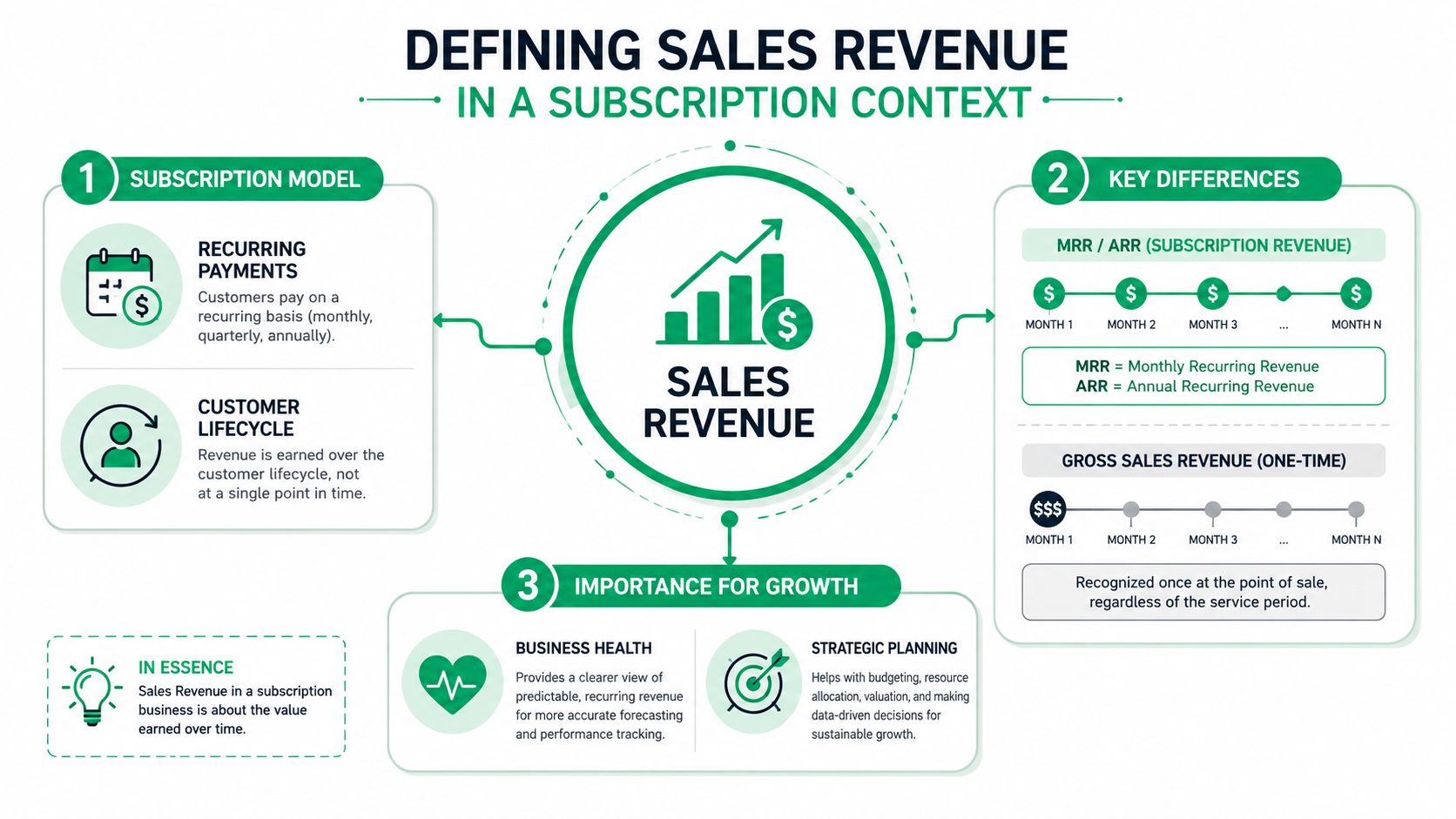
Practical rule: if the question is “what did we earn in this period,” use revenue. If the question is “how healthy is the recurring base,” use MRR or ARR.
That distinction matters in billing reviews, board decks, and renewal analysis. A monthly close can look clean in Stripe and still be wrong if you've mixed a recurring metric with a revenue metric. If you need the accounting lens behind that split, the founder's guide to ASC 606 is a useful companion because it frames why timing and recognition rules matter even when cash hits earlier. For teams comparing billing events with recognized revenue, the internal notes in Revcover's deferred revenue definition help connect the billing side to the accounting side without blurring the two.
Standard Formulas for Subscription Revenue Calculation
The arithmetic doesn't change just because the business is recurring. The cleanest subscription version of sales revenue still starts with a price input and a count input, then gets reduced by deductions when you move from gross to net. Salesforce notes that subscription businesses should use their defined fiscal period and rely on average contract value as the key pricing input, while HubSpot uses the same basic unit-times-price structure for revenue reporting over a fixed period (Salesforce's revenue lifecycle guidance, HubSpot's sales revenue guide).
Gross revenue in subscription math
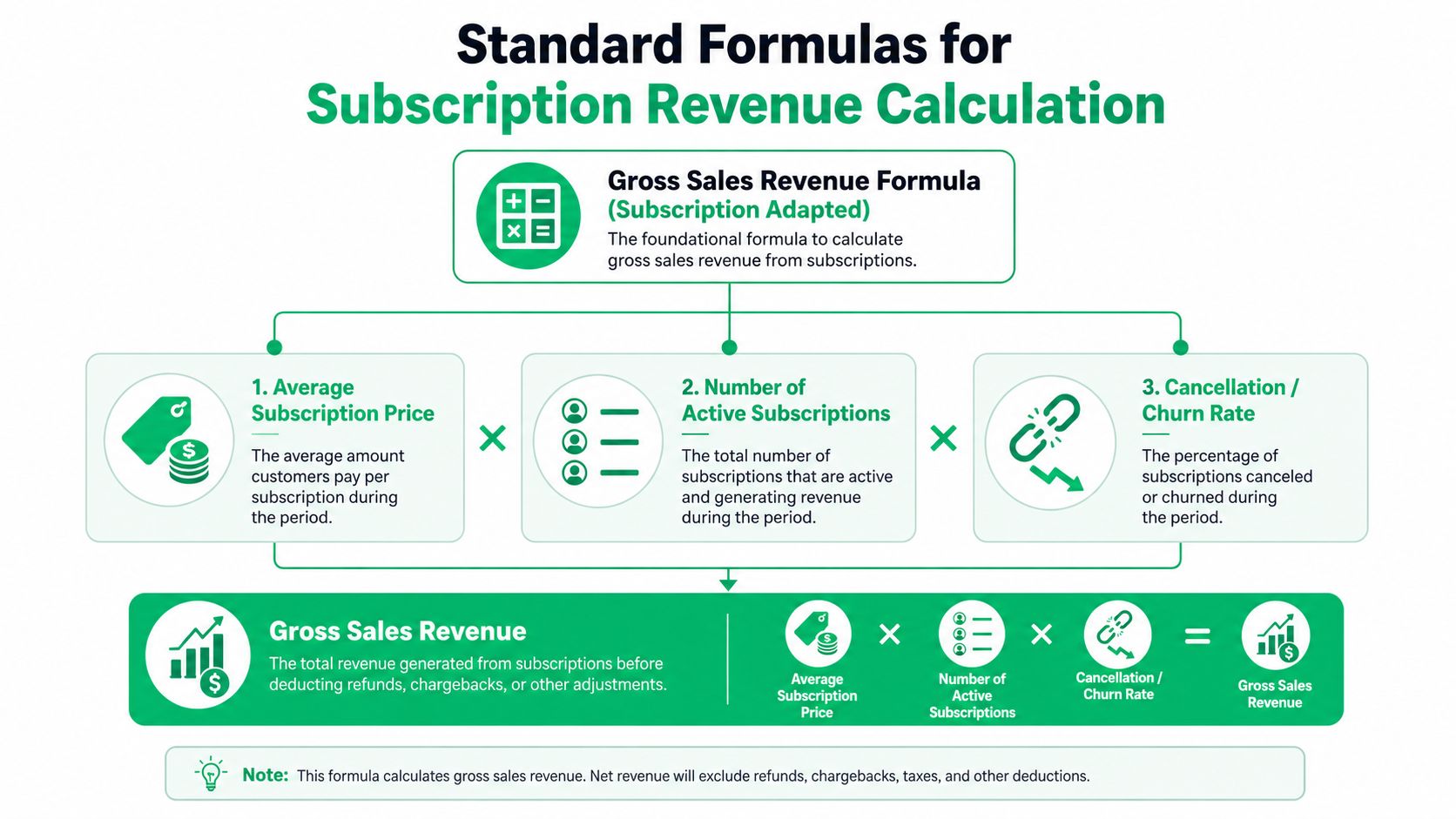
For recurring businesses, the most practical gross formula is:
Gross Sales Revenue = Active Subscribers × Average Subscription Price
If your billing motion is service-led rather than pure self-serve, swap in the average price of services or average contract value. The point is the same. You're multiplying the customer count or unit count by the relevant price basis, then measuring that total for a fixed period.
MRR and annual planning
A common operating shortcut is MRR = Subscribers × ARPU, which Instantly describes as a direct way to calculate monthly recurring revenue. That formula is useful because any change in subscriber count or ARPU immediately changes the baseline (Instantly's MRR explanation). From there, ARR is the annualized version of that recurring baseline, used for longer-range planning, territory sizing, and board-level forecasting.
Net sales after deductions
Gross revenue is not the final number most finance teams want. Salesforce says net sales revenue is obtained by subtracting cost of goods sold from gross sales revenue, and the broader standard formula also subtracts returns, allowances, and discounts before you call the number complete (Salesforce's revenue lifecycle guidance, Spur's sales revenue guide). That's the version you want for reconciled reporting, because it reflects the revenue that belongs in the period.
| Formula | Use case | What it tells you |
|---|---|---|
| Gross Sales Revenue = Subscribers × Average Subscription Price | Monthly close, billing analysis | Top-line recurring billing before deductions |
| MRR = Subscribers × ARPU | Retention, churn, expansion tracking | Current monthly recurring baseline |
| Net Sales Revenue = Gross Sales Revenue minus returns, allowances, and discounts | Accounting close, board reporting | Revenue after deductions |
Operational shortcut: build the gross number first, then layer deductions on top. Trying to calculate net directly usually creates reconciliation gaps.
Worked Examples Covering Prorations and Refunds
The formula is easy until a customer upgrades mid-cycle, a save offer changes the billable amount, or a failed payment gets recovered after dunning. That's where revenue math stops being theoretical and starts looking like a spreadsheet full of timing differences. The safest way to handle those cases is to treat each billing event as its own line, then roll the lines into the period total.
Four subscription scenarios
| Scenario | Starting MRR | Events | Adjustments | Net Revenue Impact |
|---|---|---|---|---|
| New monthly subscription | One active subscriber at the plan price | Customer starts on day one of the period | No proration, no refund | Revenue equals the full period amount tied to that subscription |
| Mid-cycle upgrade | Existing subscriber on a lower plan | Customer moves to a higher plan before period end | Split the month across two price points | Revenue includes both plan values for their respective active days |
| Save offer then churn | Subscriber accepts a targeted discount, then cancels | Save path lowers the price, then customer leaves | Discount reduces gross, churn removes the ongoing baseline | Revenue reflects the discounted period only, then stops after cancellation |
| Failed payment then recovery | Active subscriber enters dunning | Payment fails, then succeeds in recovery flow | Temporary loss, then recovered billing event | Revenue dips during failure, then returns when the payment is captured |
A clean example makes the pattern obvious. If a customer starts a plan at the beginning of the month, the revenue for that subscription is the plan price for the period. If that same customer upgrades halfway through the month, you don't pick one price and ignore the other. You allocate revenue across both plan states according to when each one was active.
The same logic applies to discounts and refunds. A save offer lowers the billable amount for the active period, which means gross and net will diverge even if the customer stays subscribed. If the customer later churns, the recurring baseline ends after the final active period, so you should not carry the discounted state forward past cancellation.
Prorations and recovery flows
Proration is where many teams lose the trail. The clean move is to log the event date, the old plan, the new plan, and the amount attached to each segment. If a payment fails and later recovers, that recovered payment belongs in the period where the billing event succeeds, not in the original failed attempt.
A recovery workflow can restore the revenue baseline, but it shouldn't erase the failed state in your event log. Keep both, or the close won't explain the swing.
Refunds need the same discipline. If money goes back to the customer, the gross line and the net line no longer match. That's normal, and it's exactly why teams that only watch headline revenue end up asking why Stripe and finance disagree.
Common Calculation Errors and Edge Cases
Most bad revenue numbers come from operations, not math. The formula can be right and the report can still be wrong if the period boundary is off, the price source is stale, or the team accidentally includes amounts that don't belong in revenue. Spur's guide calls out the same recurring mistakes, especially mixing gross and net, using the wrong period, applying outdated prices, and counting taxes or pass-through fees as revenue (Spur's sales revenue guide).
The mistakes that show up in real closes
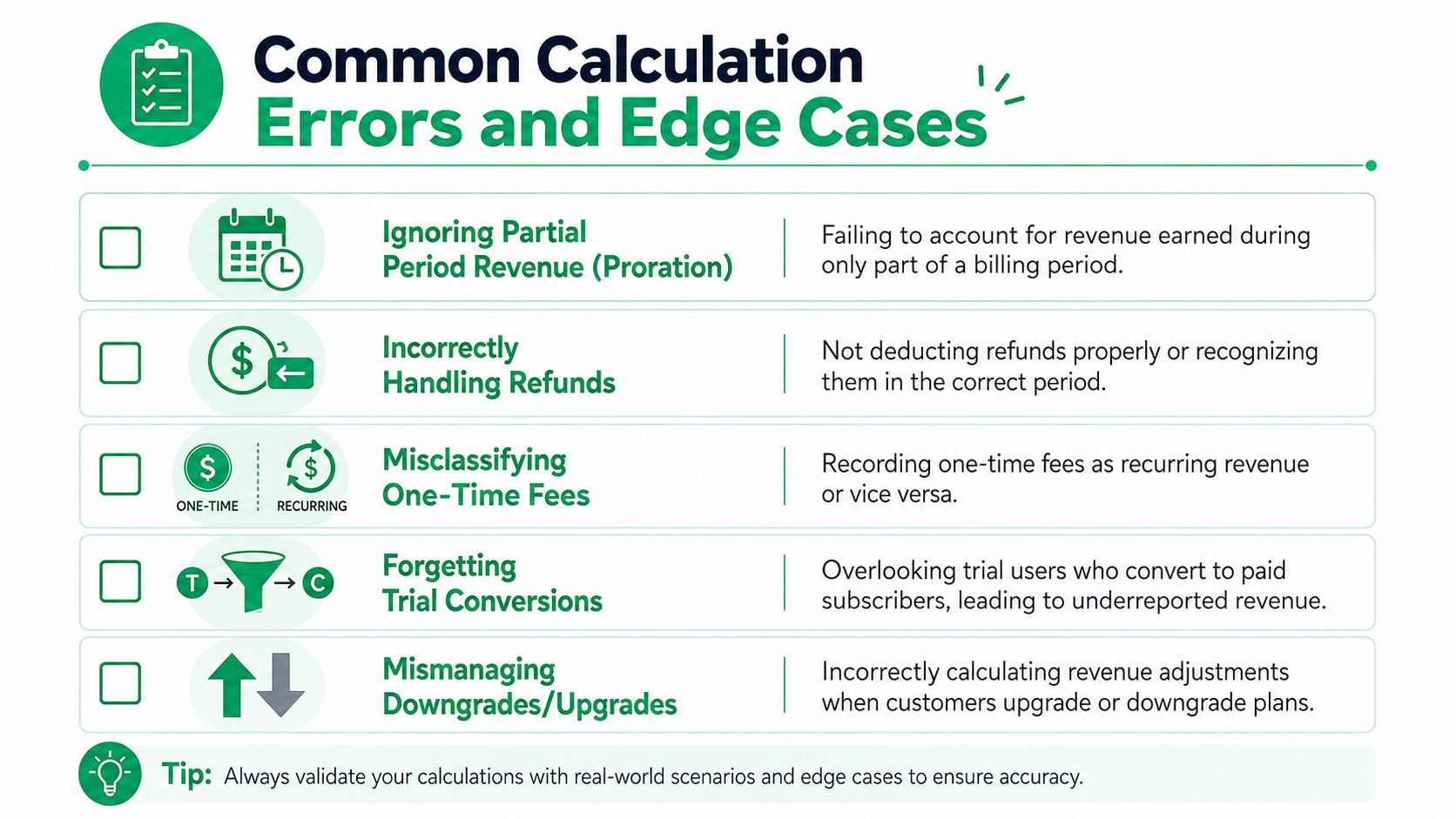
- Ignoring partial-period revenue: a subscription starts or upgrades mid-cycle, but the report books the full month as if nothing changed.
- Incorrectly handling refunds: the refund exists in Stripe, but it never makes it into the net revenue rollup.
- Misclassifying one-time fees: setup charges, pass-through fees, or taxes are counted as recurring revenue.
- Forgetting trial conversions: a trial turns into a paid account, but the start date gets anchored to the wrong event.
- Mismanaging downgrades and upgrades: the plan change is captured, but the old and new prices aren't split cleanly across the period.
Why Stripe makes these errors easier to miss
Stripe event timestamps and subscription change logs are precise, which is helpful until they cross a reporting boundary. A cancellation at the end of one period and a recovery at the start of the next can look like a single customer story while affecting two different closes. That's why the same source family recommends transaction-level tracking, a fixed period, and reconciliation against accounting records rather than relying on a summary dashboard alone (Salesforce's revenue lifecycle guidance).
The fix is mechanical. Keep a transaction table with dates, plan state, unit price, discounts, refunds, and the final revenue amount for each row. Then compare the resulting total against the accounting record before the close locks. If the numbers disagree, the issue is usually timing, not business performance.
Reconciling Stripe Billing Data to Your Revenue Report
If the dashboard and the books disagree, reconciliation is where you find out which side is wrong. Stripe gives you the event history, but it won't automatically tell you how to present gross revenue, deductions, and recovered payments in a close-ready format. That's why the best teams build a row-level table first, then roll upward by channel, product, or campaign.
Start with a full export of Stripe billing events for the fixed period. Then build a transaction table with date, channel, plan, units, price, refunds, allowances, and discounts for every row. That structure lets you calculate gross revenue per row, subtract deductions to get net revenue, and group the result by the view leadership needs.
Reconciliation checks that catch real problems
- Period boundary check: verify that each event belongs to the right month or quarter.
- Price source check: confirm that the price in the export matches the current plan price for that date.
- Recovery check: make sure recovered payments land in the period where the charge succeeded.
- Refund check: trace every refund from the billing event to the net rollup.
- Missing transaction check: compare the Stripe event count with the accounting line items before the close is finalized.
For teams that need a tighter accounting handoff, the Receipt Router financial admin tips are useful because they show how billing systems and accounting systems can stay aligned without turning the close into a manual cleanup exercise. When the billing stream feeds the ledger cleanly, the revenue report stops wobbling.
If you need to map timing differences back into accounting language, Revcover's accrued revenue journal entry is a practical companion. It helps separate the billing event from the recognized revenue entry, which is exactly where SaaS teams get tripped up after a delayed invoice, a recovery, or a late-month subscription change.
Close rule: never accept a dashboard number until you can explain the largest variance line by line.
Metrics and Dashboards for Revenue Visibility
A single revenue number is too blunt for a subscription business. Heads of Growth need to know which motion is adding recurring base, Product wants to see whether save offers or plan changes are working, and Customer Success needs a fast signal when cancellations spike. The dashboard should break the story into separate panels for new MRR, expansion MRR, churned MRR, recovered MRR, and net revenue retention, because each metric tells a different part of the same business story.
What the dashboard should show
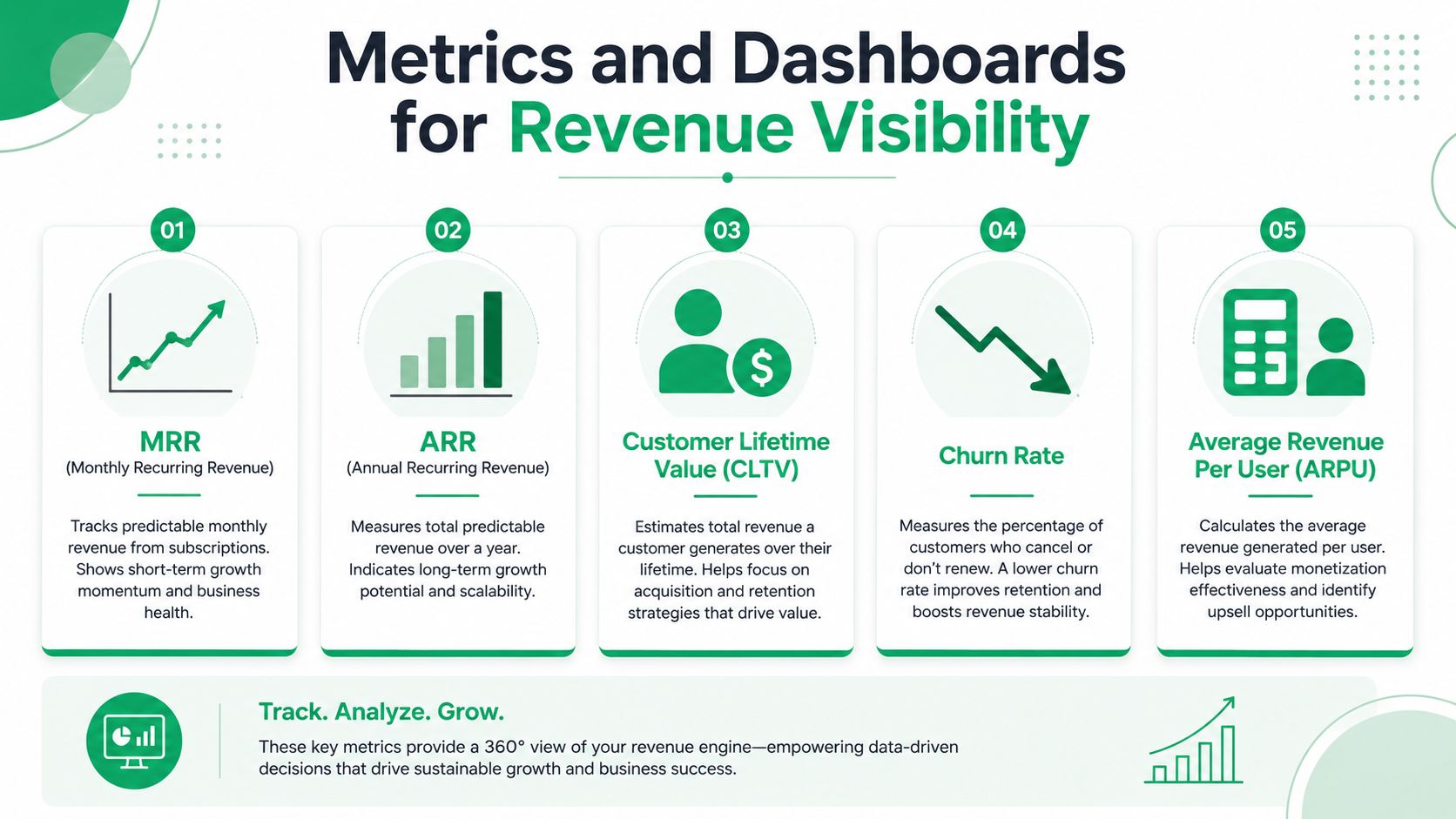
- MRR: the monthly recurring base, which keeps billing changes visible.
- ARR: the annualized planning view, useful for leadership and forecasting.
- CLTV: a longer-horizon customer value lens, helpful for channel decisions.
- Churn Rate: the cancellation pressure that explains why revenue stalled.
- ARPU: the average revenue per user, which helps you spot pricing or mix shifts.
A good dashboard also separates one-time revenue from recurring revenue. That keeps implementation fees, pass-through charges, or other non-recurring items from distorting the subscription story. If payment recovery matters to your business, give recovered revenue its own view instead of hiding it inside net MRR.
The internal guide on how to calculate run rate is a useful complement here because run rate and revenue reporting often get mashed together in leadership meetings. Keep the two distinct, then use alerts for the accounts that can move the number quickly. Slack notifications for high-value cancellations and synced recovery segments in CRM or ad platforms make the dashboard operational, not just descriptive.
If your monthly close still breaks on prorations, failed payments, and recovery timing, Revcover helps subscription teams capture cancellation intent, coordinate save offers, and track recovered MRR inside Stripe-connected workflows. Visit Revcover to see how it fits into a revenue recovery stack built for SaaS billing teams.